


FREE · OPEN SOURCE · ON YOUR OWN SERVER
Securely send large files. Synchronize folders live.
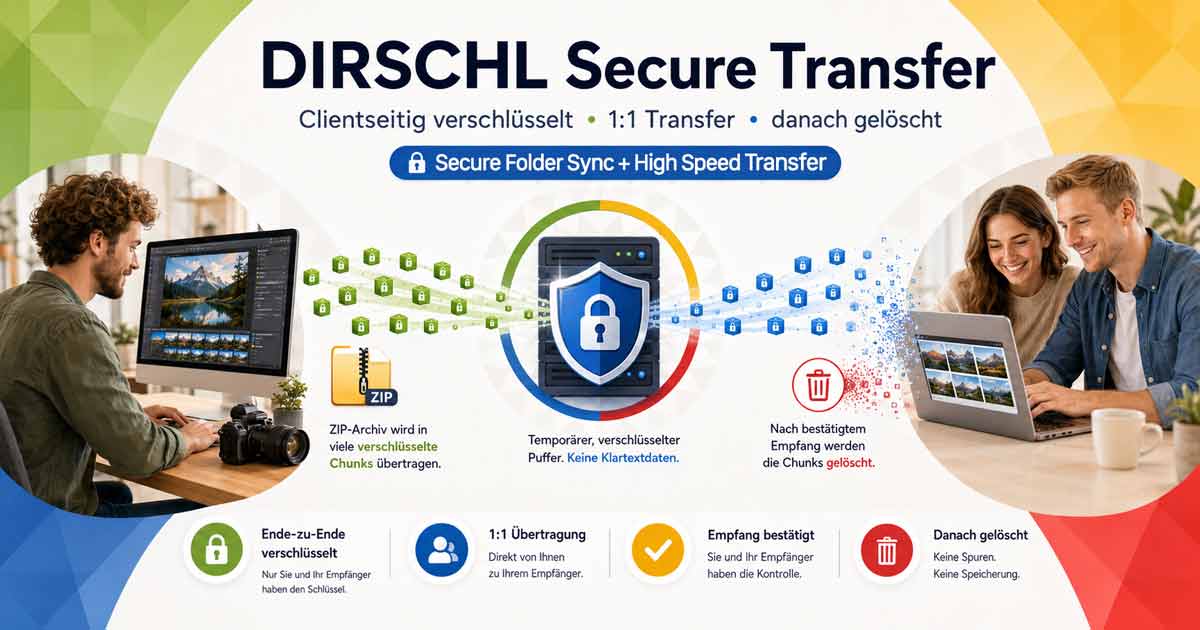
DIRSCHL Secure Transfer runs on hosting you control. Files are encrypted in the browser, transferred in small data blocks, and only decrypted by the recipient. The server does not receive the key.
As a self-hosted WeTransfer alternative with PHP, the application is suitable for photographers, agencies, and companies that want to provide encrypted file uploads for clients without registration and without requiring a third-party cloud.
GPLv3+ · PHP 8.1+ · MySQL/MariaDB · German and English · no recipient account needed
HOW IT WORKS
Directly from your computer to your client
You deploy the application once on your subdomain. After that, a browser and a link are sufficient – no additional software or recipient account is required.
1. Select file or folder
The sender logs in, selects a file, or starts a live folder. Encryption begins locally in the browser.
2. Share link securely
Secure Transfer generates a share link. For sensitive content, the link and key can be transmitted via separate channels.
3. Receive and decrypt
The client opens the link. The data blocks are loaded, decrypted in the browser, and written as a file or directly into the target folder.
FOUR MODES OF OPERATION
For quick sending and ongoing collaboration
Secure Transfer combines one-time file transfers, protected client uploads, and two different types of folder synchronization.
Send file
Encrypt and upload large files, up to the configured limit. The recipient can download available blocks even while the upload is in progress.
Request upload
You send your client an upload link. The client uploads encrypted files to your server without a user account.
Mirror live folder
New, changed, and – in mirror mode – deleted files are synchronized between the source and target folders.
Transfer only
New and changed files reach the client. Additional files or those later deleted at the source remain untouched.
PHOTOGRAPHY AND MEDIA
The client sees new images as soon as they are saved
In Chrome or Edge, select your source folder. Your client selects the target folder. New images, subfolders, and, if desired, all file types are automatically detected and transferred encrypted – without a second manual upload step.
Exact Mirroring
The source is authoritative. Deleted files also disappear from the client's end, and changes are corrected. A partially transferred target folder can be resumed as long as it contains no foreign paths.
Transfer Without Deletion
New and changed files are updated. Anything extra present at the client's end or later deleted at the source remains untouched.
SECURITY EXPLAINED SIMPLY
The key remains off the server
For each transfer, the browser generates a 256-bit key. AES-GCM protects each data block. New transfers additionally cryptographically link transfer, file, version, and block position.
Encrypted before upload
Unencrypted data never leaves the browser. Encrypted blocks and necessary technical metadata are stored on the server.
Key in URL fragment
The decryption key is only stored in the URL fragment after #. This part of the link is not transmitted to the web server during normal browser requests. As long as the key remains in the URL fragment, the server has no access to the plaintext of the files at any point during the intended transfer process.
Controlled deletion
Expiration times, manual deletion, cleanup cron, and an optional 1:1 short buffer reduce storage duration.
Important: Anyone who possesses the complete link, including the key, can decrypt the data. For sensitive content, transmit the link and key separately and protect both like access credentials.
SELF-HOSTED INSTEAD OF THIRD-PARTY CLOUD
An alternative to WeTransfer, Dropbox, and FTP
Compared to WeTransfer or Dropbox, DIRSCHL Secure Transfer can be operated entirely on your own server. This means no third-party cloud and no additional app subscription are required for file transfer. If you choose hosting and integrated services within the EU or EEA, you can implement file transfer without technically necessary transmission to a third-country cloud provider. Whether the specific operation is GDPR-compliant also depends on hosting, configuration, and the operator's organizational measures.
This makes Secure Transfer particularly interesting for IT managers and data protection officers who want to implement GDPR-compliant file transfer without an external cloud within their own infrastructure.
For senders and recipients
- Link in browser instead of FTP account and client software
- no recipient user account
- large files in encrypted chunks
- Live folders with mirror or update mode
For operators
- your own hosting and database
- personal administrator and creator accounts
- configurable limits and expiration times
- no third-party cloud required
TEST INSTANTLY, NO DEMO ACCOUNT REQUIRED
Create your own transfer link directly
No demo login required: Create your own transfer link directly on transfer.dirschl.com. The encryption generates the key ad hoc on your device – without the need to create a user account for this test.
Encrypted file upload for clients without registration
The recipient works directly in the browser. Neither app installation nor a dedicated recipient account is required for a normal download or requested client upload.
INSTALL IT YOURSELF FOR FREE
As simple as a small web application
A hosting environment capable of running WordPress usually also meets the requirements for Secure Transfer. WordPress itself is not needed.
- Download the ZIP and upload the complete package to your hosting environment.
- Create a subdomain, for example
transfer.your-domain.com, and set the webroot to thepublic/folder. - Create an empty MySQL/MariaDB database, open
/install, and create the first personal administrator account.
Requirements: HTTPS, PHP 8.1 or newer, PDO MySQL, and MySQL/MariaDB. With ALL-INKL, the database user is usually identical to the database name; with other hosts, it may differ.
CURRENT INSTALLATION PACKAGE
DIRSCHL Secure Transfer
Free to use, inspect, and adapt under the GNU General Public License Version 3 or later.
- Application and web installer
- German and English interface
- Installation and security documentation
- GPLv3+ license text
No registration, no license key, and no hidden feature restrictions.
OPTIONAL SERVICE FROM DIRSCHL.COM
Want to start sending files right away?
The software remains free. Upon request, DIRSCHL.com GmbH can handle setup, security review, customization, and support on your hosting account.
Installation
Subdomain, webroot, database, HTTPS, cron job, and initial functional test are set up cleanly together.
Customization
Custom name, description, language, preview image, limits, and suitable operating parameters for your use case.
Support
Assistance with updates, hosting questions, tests, and the classification of technical security requirements.
FREQUENTLY ASKED QUESTIONS
What prospective users want to know before installation
Is Secure Transfer really free?
Yes. The application can be downloaded without a license key and operated, inspected, and adapted under GPL-3.0-or-later. Your only costs are for hosting or any installation and support you choose to commission.
Do recipients or clients need an account?
No. The transfer works directly in the browser via a link. Accounts are only required for authorized senders and administrators of your own installation.
Where is the decryption key stored?
Only in the URL fragment after the # character. This fragment is not transmitted to the server during normal browser requests.
Can DIRSCHL.com read my files?
With a self-hosted installation, DIRSCHL.com has no access to your server. Content is already encrypted in the browser; the decryption key is not transmitted to the application server.
Can Secure Transfer be operated on standard web hosting like ALL-INKL?
Yes. A standard PHP environment is sufficient if HTTPS, PHP 8.1 or newer with PDO MySQL, and a MySQL or MariaDB database are available. The subdomain must point to the included public/ folder.
Which files and folders can be transferred?
Individual files are sent via normal transfer. If the file filter in the live folder remains empty, all files, as well as nested folders and empty subfolders, are considered.
What happens if a source file is deleted?
In "Exact Mirroring" mode, it is also removed from the target folder. In "Transfer Only/Update" mode, the received file remains with the client.
ACADEMY & SELF-HOSTING
Deploy securely. Understand architecture. Empower teams.
Do you want to deploy Secure Transfer on your own corporate subdomain or train your teams in modern web cryptography and AI-powered development? We support you within the DIRSCHL Academy with implementation, knowledge transfer, and secure operation.
For companies and IT teams
- Installation on your own subdomain
- Hosting and security configuration
- Training on client-side web cryptography
- AI-powered development and custom workflows
DEVELOPED IN BAVARIA
A free app by DIRSCHL.com GmbH
We combine web development, photography, and practical AI and digital projects. Secure Transfer originated from a real workflow: images should reach the client as they are created – securely, directly, and on your own infrastructure.
Verified answers
More frequently asked questions
How can I transfer large files securely?
Unprotected email attachments are unsuitable for confidential or large files. Secure Transfer provides focused transfer and upload paths without requiring every client to create an account. Because the application is self-hosted, the server, HTTPS, backups, access rights, logging and deletion policy must fit the use case. The actual protection depends on this configuration and the surrounding organizational processes.
Last reviewed: