


FREE · OPEN SOURCE · YOUR OWN API KEY
DIRSCHL AI Media – Create image metadata with your own AI.
Generate, review, and store alt text, titles, captions, and descriptions directly in the WordPress Media Library. Single image, bulk, and optional upload automation use your own Gemini, OpenAI, or compatible access; no DIRSCHL API key or hidden AI quota is included.
Version 2.7.0 · WordPress 5.8+ · PHP 7.4+ · free full functionality · GPL
Download plugin for freeInstall via DIRSCHL HubSecure Quick Start
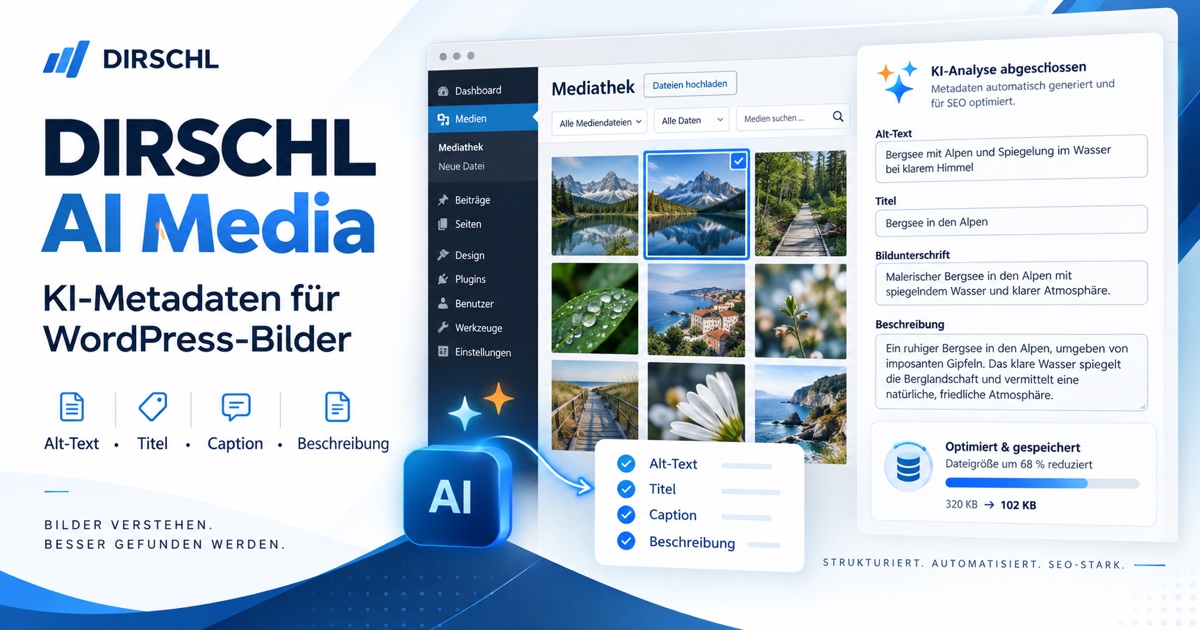
Four well-maintained media fields – a better image archive
WordPress manages four editorial details per image. AI Media generates them separately so that each field fulfills its purpose:
- Alt text: describes the relevant visible motif for screen readers and provides image context for search engines.
- Title: gives the attachment an understandable name instead of a technical upload file name.
- Caption: can be visibly displayed in galleries and below images.
- Description: records more detailed editorial context for the attachment.
Complete, accurate information improves the usability of the media library and galleries. For SEO and image search, these are helpful signals – however, the plugin cannot guarantee a placement. Decorative images should still have empty alt text for accessibility reasons.
Securely Connect Your Own AI
- Open Settings → AI Media.
- Select Google Gemini, OpenAI, or an OpenAI-compatible API.
- Define the key source: save in the plugin or retrieve from the WordPress configuration.
- Enter an image-capable model. For a compatible API, also provide the full HTTPS URL of the chat completions endpoint.
- Start with a single non-critical test image and New AI.
No Shared DIRSCHL Key: API usage, limits, and costs are exclusively tied to your account. The saved key is used server-side, not written back to the settings form, and not delivered to the browser.
Key from wp-config.php or another plugin
WordPress Core does not provide a universal AI key. Select WordPress Configuration / Filter if the key should not be stored in the plugin option. Supported options include:
DIRSCHL_AI_MEDIA_API_KEYfor any providerGEMINI_API_KEYfor GeminiOPENAI_API_KEYfor OpenAI and compatible providers- Filter
dirschl_ai_media_api_keyfor password managers or existing integrations
For additional providers, dirschl_ai_media_analyze_image, dirschl_ai_media_api_endpoint, and dirschl_ai_media_api_headers are also available. These allow you to add your own adapter without exposing the plugin code or a key.
Single Image, Suggestion, Bulk, and Upload
- Optimize AI: Directly fills in missing fields according to the protection setting.
- New AI: Re-analyzes and initially enters the suggestion into the editable fields. Only Save applies the title, filename, alt text, caption, and description.
- Edit Inline: All five entries can be maintained in the AI Media column of the Media Library list view; character counters show the configured limits.
- Bulk Action: Select multiple images and choose Generate AI Media.
- Automatic for Uploads: Schedules new images via WP-Cron after five seconds. For this to work, WP-Cron must run reliably.
If the API is unreachable, the key is missing, or the response is invalid, the media fields remain unchanged. AI Media does not write generic placeholders to your media library.
What the AI Receives for its Assessment
For analysis, an image variant scaled down to a maximum of 1024 pixels is used. This saves transmission volume and leaves the original untouched. Additionally, the prompt may contain the following information:
- Filename without extension and WordPress size suffix
- Existing title, alt text, caption, and description
- Available EXIF information such as camera, lens, focal length, aperture, exposure time, ISO, and capture date
- Optionally, the complete HappyFiles path including parent folders
These values are hints, not factual claims. The default prompt explicitly requests not to invent anything that is not visible in the image.
All Settings Explained
- AI Provider, Key Source, API Key, Model, and Endpoint: determine the Vision API used.
- Use AI: activates automatic processing for new uploads only; manual actions remain available.
- AI Prompt: freely customizable work instruction.
{existing_metadata}is replaced by media and EXIF data. - JSON Keys: allowlist of accepted response fields: object, scene, style, alt, title, caption, description, keywords, location, quality.
- Protect Existing Values: only fills empty fields; if deactivated, the AI may replace existing information.
- Scale Originals / Maximum Width and Height: controls WordPress’ threshold for large uploads.
- JPG Quality: sets the WordPress quality for newly generated JPEG files and sizes.
- Limits: maximum length for title, description, alt text, and caption, as well as minimum length for alt text.
- Include HappyFiles: sends the folder path as additional semantic context.
- Slugify Filenames: cleans special characters and path characters when manually changing filenames.
- Debug Logging: writes technical diagnostics to the WordPress log; keys are not logged.
Storage Analysis, Usage, and Cleanup
Under Media → Storage Analysis, the plugin determines the storage requirements of an attachment, including the main file, unscaled original file, and all WordPress sizes. The scan runs in time-limited packages, making it suitable for shared hosting. The separate usage check searches featured images, pages and posts, custom fields/Divi, options, and the DIRSCHL Reference Hub.
- Sorting by total storage and breakdown of all variants
- Filters Only PNG and Only Unused
- Up to five found usage locations directly linked
- Re-live check before each deletion; aborts if a reference is found
Automatic detection may overlook dynamically generated or external references. Therefore, a backup and editorial review are required before final deletion.
PNG → JPG with Preview
Large PNGs over 100 KB are marked as potential candidates. Before conversion, select a quality from 70 to 92 and compare the original, preview, transparency notice, and expected savings.
- Existing attachment ID and all editorial media fields are preserved
- WordPress regenerates image sizes for the new JPG
- Known URLs in content and post meta are converted from .png to .jpg
- Transparency is reduced to white
- The source PNG remains on the server as a
.bakfile
Replacing an original file is an administrative intervention. Always check backups, previews, and important pages before a mass conversion.
Installation via the DIRSCHL Hub
- Download the free DIRSCHL Hub and install it as a WordPress plugin.
- Open DIRSCHL → Hub.
- In the unified plugin catalog, click Install for DIRSCHL AI Media, then click Activate.
- Under Settings → AI Media, configure the provider, your own key, image-capable model, and desired prompt.
- Leave Protect existing values enabled and initially keep automatic uploads disabled.
- In Media → Media Library, switch to list view and select AI new for a non-critical image.
- Review the suggestion, save it, and only then activate bulk processing or automatic uploads.
Neither a DIRSCHL license key nor a DIRSCHL account is required. Updates will subsequently appear like normal WordPress plugin updates.
Direct ZIP Installation
- Download the current plugin ZIP for free.
- Open Plugins → Add New → Upload Plugin.
- Select the ZIP, install, and activate.
- Open Settings → AI Media and connect your AI provider.
- Start with a non-critical image and protected existing values.
Current Version 2.7.0 · The package does not contain provider keys. API costs are only incurred through the provider you choose.
Data Privacy, Costs, and Responsibility
For every AI analysis, a reduced image copy, the prompt, and the activated context data are transmitted to the selected provider. This may include the file name, existing media fields, EXIF data, and HappyFiles folder names. Operators must independently verify whether this transmission is permissible, which contracts or notices are required, and whether personal or confidential motifs may be processed.
DIRSCHL AI Media does not include an AI quota. Prices, retention, training usage, regions, limits, and availability depend on your provider, contract, and model. API keys should not be included in screenshots or support messages.
Frequently Asked Questions
Do I need Gemini?
No. Version 2.7.0 supports Gemini, OpenAI, and OpenAI-compatible Chat Completions APIs. The selected model must be able to understand images.
Does WordPress have a built-in AI key?
No. However, an existing key can be provided via wp-config.php or the documented filter.
Does the plugin overwrite existing metadata?
With Protect existing values, only empty fields are supplemented. AI new shows a verifiable suggestion before saving.
What happens in case of an API error?
The fields remain unchanged. An error message states the reason; no placeholders are saved.
Are all images automatically transmitted?
Only if automatic upload is activated or a single/bulk action is triggered. Storage and usage analysis do not require AI.
Does storage analysis automatically delete images?
No. Deletion requires an explicit action and is checked again immediately beforehand against known uses.
Is the plugin a substitute for editorial review?
No. Image context, accessibility, brand terms, and location information should always be checked by a human.
Free Plugin. Professional Services.
DIRSCHL AI Media is installed and updated for free with full functionality via the DIRSCHL Hub. The package does not include provider keys or AI quotas: Gemini, OpenAI, or compatible API access must be provided by the operator; usage costs may apply. Individual setup, customization, and training can be commissioned separately.
100% Free & Open Source
DIRSCHL AI Media can be used, reviewed, customized, and further developed for your own projects under the terms of the GPL-2.0-or-later without a DIRSCHL license. There are no paid feature locks and no required DIRSCHL account.
Developed by Johann Dirschl. Do you want to develop your own WordPress plugins with Cursor AI or Codex, or automate workflows? The DIRSCHL Academy offers B2B training for AI-assisted Development and WordPress Automation.
Download plugin for freeInstall via DIRSCHL HubDIRSCHL Academy
Verified answers
More frequently asked questions
How can I create alt text for WordPress images with AI?
The plugin supports structured maintenance of larger media libraries but does not replace editorial decisions. Alt text must match the visible image and its function on the specific page; decorative images may not need descriptive text. Titles, captions and descriptions serve different purposes from the alt attribute. API access, privacy, cost limits and the approval workflow are configured for the project.
Last reviewed: