

Free WordPress Plugin
DIRSCHL Hub
The DIRSCHL Hub is the central management system for DIRSCHL plugins in WordPress. It installs and updates the free catalog, manages shared API connections, and creates an update-safe child theme for the active parent theme.
It also controls shared CSS variables and exposes clearly described Hub operations to authenticated automation clients and AI agents through the native Abilities API on WordPress 6.9+.
Current version 0.6.8 · permanently free.
A Catalog for All DIRSCHL Plugins
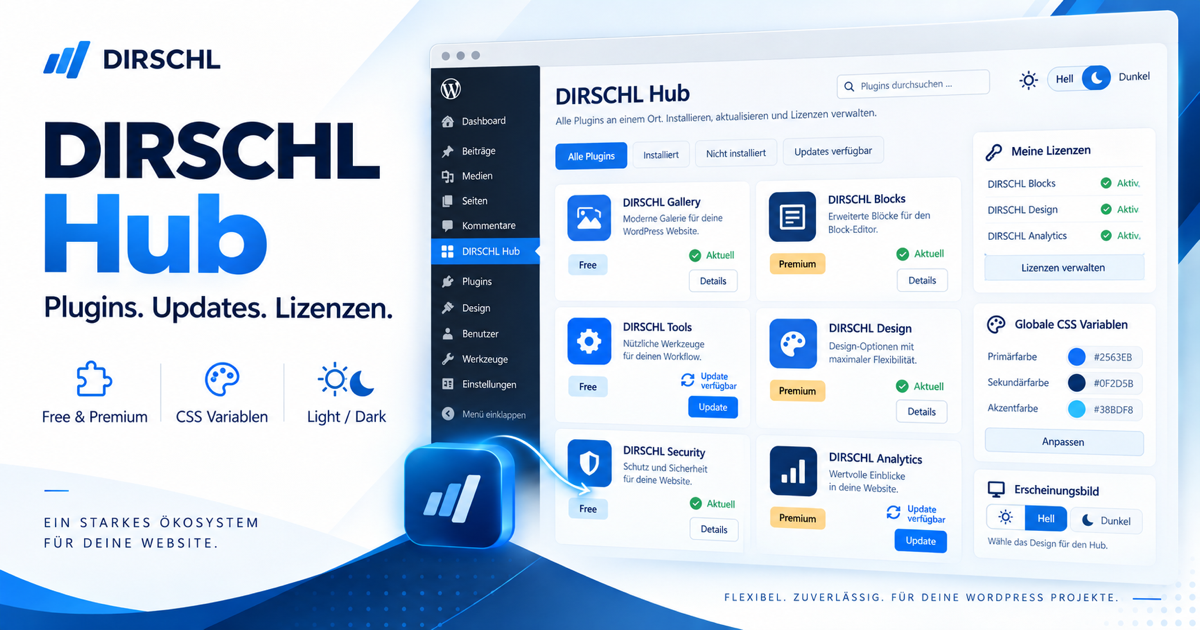
In the WordPress backend, the Hub bundles all available DIRSCHL products. On each product card, you can see the description, version status, and installation status. From there, you can install any plugin, activate an existing plugin, or open the corresponding product page with instructions.
- Full functionality: install and update from the Hub without a license.
- Product pages: directly access features, configuration, examples, and notes.
- Targeted selection: You only install the plugins you truly need.
You can find the complete catalog on the Plugin Overview.
Control WordPress via AI Prompt, Not Clicks.
Forget tedious backend clicking. With the DIRSCHL Hub, we connect WordPress directly to modern AI development environments like Cursor, Codex, and Claude Code.
Install the free Hub – and orchestrate your entire website directly through your editor or agent:
- 100% Free & Full Feature Set: All modules (AI Translation, AI Media, Social Media, and Apps) are completely free, fully localized (EN & DE), and served directly from our own infrastructure.
- Native WordPress Support: Tested as a general WordPress plugin suite with Gutenberg, Divi 4, and Divi 5. Divi and HappyFiles receive dedicated integration support but are not required.
- Centralized API Keys & Child Theme Generator: Manage API keys once centrally inside WordPress across the entire suite, and generate clean Child Themes directly via the Hub.
- Agentic Orchestration: Configure interfaces, translations, and media workflows conversationally through your AI agent—eliminating manual page maintenance.
“The DIRSCHL Hub turns any WordPress installation into an AI-native development and publishing platform. Install, connect, orchestrate.”
Security boundary: The Hub does not open anonymous remote access. The site owner must explicitly configure the WordPress access used by the client, for example through a project-specific agent, REST, or WP-CLI setup. Every call still checks the appropriate WordPress capability. On older WordPress versions, all regular Hub features remain available; only the native agent interface is absent.
Download DIRSCHL Hub for FreeExplore the AI Development WorkflowView the WordPress Case Study
Enter API credentials once, centrally
Under DIRSCHL → API Connections, you manage OpenAI, Google AI, Anthropic, a compatible custom AI provider, Google Places, and YouTube Data in one place. Compatible DIRSCHL plugins automatically resolve the relevant credential, so the same key does not need to be entered in every plugin.
- WordPress 7 uses its native AI Connector options for OpenAI, Google AI, and Anthropic.
- Older WordPress versions use a non-autoloaded Hub store.
- Existing compatible plugin credentials are copied once but not deleted, preserving a rollback path.
- Credential values are never rendered in page HTML or returned through the Abilities API.
AI Media, AI Translations, Answer Engine, Google Reviews, and YouTube Playlist already support central resolution. External API usage may still incur provider charges independently of the free plugin.
A child theme without another throwaway plugin
Under DIRSCHL → Child Theme, the Hub creates a minimal, update-safe child theme for the active parent theme. Theme settings, menu locations, the custom logo, and Additional CSS are carried over on activation. Divi receives the documented parent/child stylesheet order; block themes inherit without an unnecessary custom theme.json.
Existing theme folders are never overwritten. When a child theme is already active, the Hub does not create a child of that child. Activation remains an explicit decision.
Installation and First Steps
- Download DIRSCHL Hub as ZIP.
- In WordPress, open Plugins → Add New → Upload Plugin, select the ZIP, and activate the plugin.
- Open DIRSCHL → Hub. All plugins can be installed immediately.
- Install or activate the desired plugin; future releases will appear as WordPress updates.
Important: DIRSCHL plugins can generally be used without the Hub. The Hub is recommended for central provision, compatible dependencies, and a convenient update channel.
Central CSS Variables and Appearance
Under DIRSCHL → CSS & Theme, you manage a shared color palette for compatible DIRSCHL plugins. Separate values are available for light and dark display. A live preview shows changes before saving.
The active variables are named --dh-text, --dh-background, --dh-surface, --dh-border, --dh-accent, --dh-accent2, --dh-header, --dh-footer, --dh-control, and --dh-input. This allows for consistent design of surfaces, texts, borders, accent colors, headers, footers, and forms.
Light, Dark, or Automatic
You choose a fixed Light or Dark Mode or let the visitor's system setting decide. The shortcode inserts a toggle switch if desired. The visitor's selection remains in the browser and is adopted by supported plugins.
Free Provision and Updates
All DIRSCHL plugins are available without a license key, annual fee, or paid feature activation. The Hub centrally manages the official packages and updates.
- Install or activate plugins directly
- Receive updates via the familiar WordPress interface
- Open product pages and instructions directly from the catalog
For updates, the DIRSCHL Hub should remain installed and active on the website.
Frequently Asked Questions
Does DIRSCHL Hub or any plugin cost anything?
No. The Hub and all DIRSCHL plugins are available for free with full functionality. Individual services and external API usage may incur separate costs.
Do I have to install all plugins?
No. The Hub displays the catalog; you select each product individually.
Does Dark Mode overwrite my entire theme?
The Hub provides shared variables and optional theme rules. The extent to which these take effect depends on the chosen configuration and support from the theme and plugins.
Where can I find the prices for services?
Installation, setup, customization, training, maintenance, and further development are charged according to the published service prices.
Centrally Manage DIRSCHL Plugins
Install the free Hub, select the plugins you need, and keep track of updates and the shared appearance in one place.
100% Free & Open Source
DIRSCHL Hub can be used, reviewed, adapted, and further developed for your own projects under the terms of the GPL-2.0-or-later without a DIRSCHL license. There are no paid feature locks and no required DIRSCHL account.
Developed by Johann Dirschl. Do you want to develop your own WordPress plugins with Cursor AI or Codex or automate workflows? The DIRSCHL Academy offers B2B training for AI-assisted Development and WordPress Automation.