


DIRSCHL Media Manager
Free – Download, installation, and updates via dirschl.com.
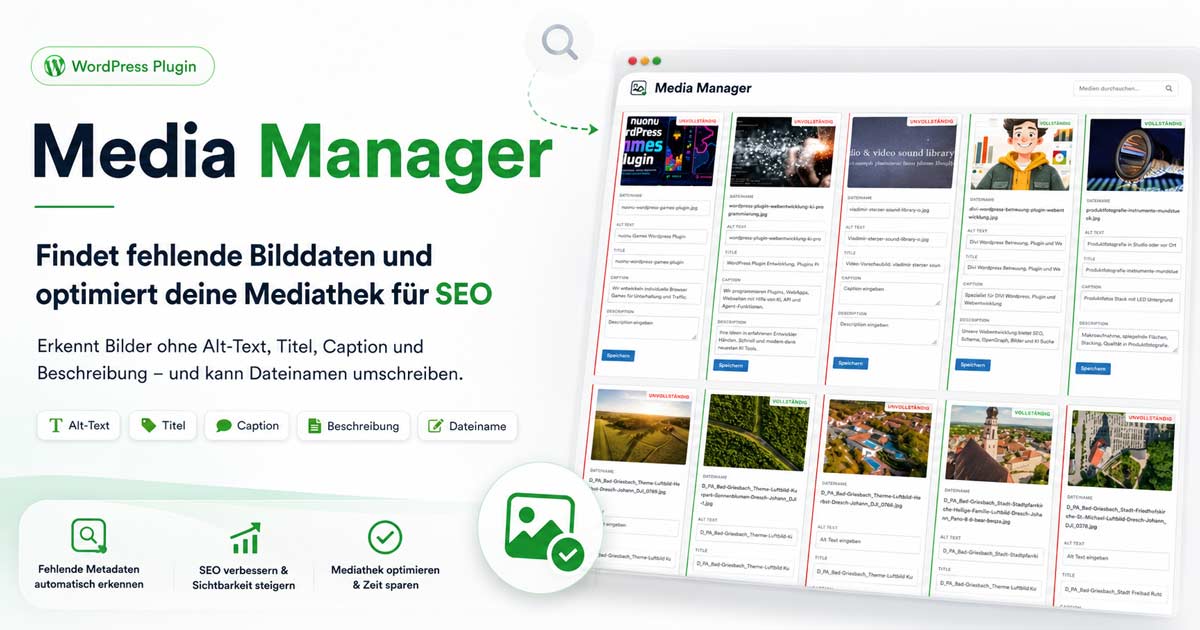
Lean tool for media library management: Edit filename, alt-text, title, and description in a clear table – without opening each image individually in the WordPress media view.
Three filter views (Incomplete, Complete, All) help quickly find SEO and filename gaps. REST API and Vanilla JavaScript, without heavy dependencies.
Download & Installation
Latest Version 1.0.1 – ZIP for manual installation (Plugins → Add New → Upload Plugin) or for automatic updates via dirschl.com.
Download dirschl-media-manager-1.0.1.zip
Previous Version 1.0.0 – if a rollback is necessary:
dirschl-media-manager-1.0.0.zip
Installation (Step by Step)
- Download ZIP 1.0.1 (buttons below)
- WordPress: Plugins → Add New → Upload Plugin
- Activate plugin DIRSCHL Media Manager
- Open Media → Media Manager
- Select Incomplete view and add missing alt-texts
- Apply changes with Save
Automatic Updates
New versions appear under Dashboard → Updates as soon as the release ZIP and info.json are available on dirschl.com.
Views
Switch between filters in the toolbar above:
| View | Shows |
|---|---|
| Incomplete | Images with missing metadata or a "problematic" filename |
| Complete | Images that meet all criteria |
| All | Entire media library (optionally exclude folders) |
Criteria "Incomplete"
| Criterion | Meaning |
|---|---|
| Alt-text empty | Accessibility & SEO |
| Title empty | Media title missing in WordPress |
| Description empty | Caption/Description not set |
| Umlauts in filename | ä, ö, ü, ß, Ä, Ö, Ü |
| Uppercase letters in filename | except file extension (.jpg, .png, …) |
Features
- Tabular overview with preview, filename, alt, title, description
- Inline editing and saving per row
- Rename file (physical filename in the upload structure)
- Folder exclusion (e.g.,
seo-img-linkhidden by default) - REST API for lists and updates – fast queries even with many images
- Vanilla JavaScript, WordPress admin style
Latest Changes
- 1.0.1 – DIRSCHL rebrand, product page, release ZIP on dirschl.com
See README.md in the plugin for details.
Configuration
- Media → Media Manager – only users with
upload_files - Toolbar: View and optionally excluded upload folders
- Adjust fields per row and click Save
- Only change filename if URLs and links can be updated accordingly
Support & Development
Media workflow, bulk import, or connection to your DAM? We develop custom WordPress plugins.