


Matomo 5 Plugin · B2B Analytics · AI Workflow
Turn Website Visits into Concrete Sales Opportunities
The Matomo Company Resolver identifies reliable company leads from website visits and prepares them for an AI-powered, prioritized sales report.
ASN, network ranges, RDAP/RIPE, Reverse DNS, providers, and company domains are linked with the actual visited content. This transforms technical signals into a clear, actionable pipeline for marketing and sales.
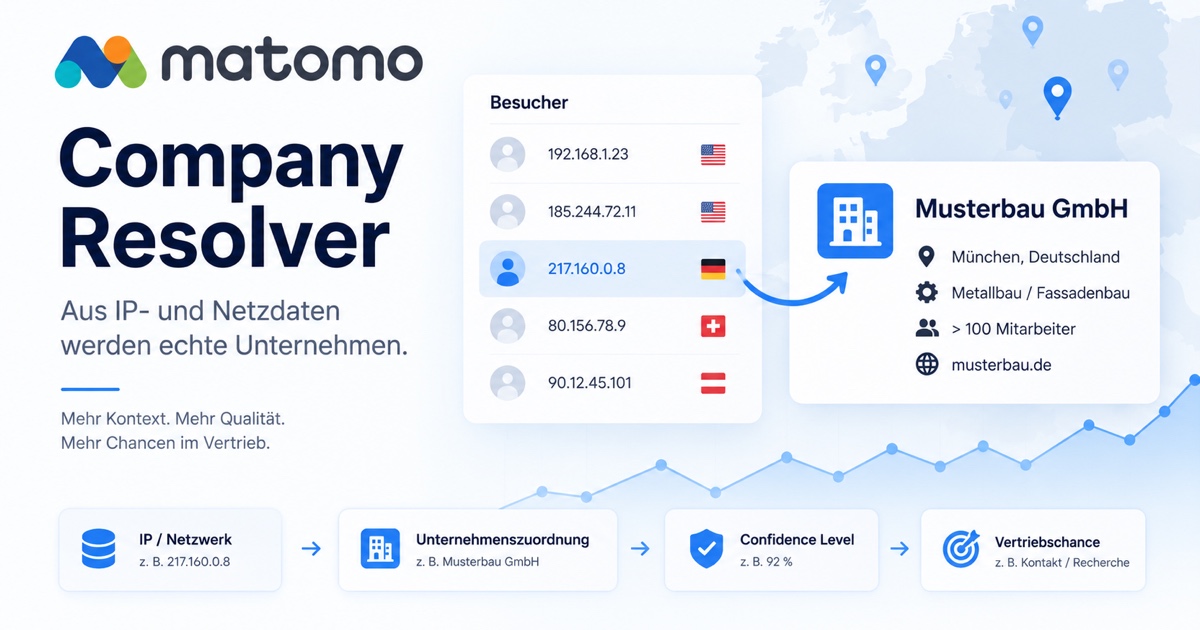
Transparent, not a black box: technical evidence, confidence scores, visitor interests, and research remain separately verifiable.
Requirements
The Resolver requires a self-hosted Matomo 5 installation with actual collected visitor data, as well as well-structured product and service pages. It cannot be used without Matomo visitor data.
Our Role
We establish the necessary data foundation, improve tracking and page structure, and enhance SEO, GEO, and visibility in AI search in conjunction with your product and service pages.
Pricing Model
The main effort is a one-time investment for Matomo setup, data and page structure, workflow, and training. After that, the technical solution operates largely automatically; ongoing lookup and AI costs typically remain low, depending on usage and provider.
From Matomo Signal to Sales Report
Data Collection, Prompting, and Evaluation in a Controlled Workflow
The Resolver replaces neither Matomo nor a CRM. It augments Matomo with technical company insights and delivers a structured data package that can be regularly evaluated with a prepared AI prompt.
1. Data Collection
Matomo records the visit. The Resolver evaluates ASN, RDAP, Reverse DNS, network range, provider, and domain, separating potential customer networks from mobile, cloud, hosting, and general providers.
2. AI Prompt
Visits, page sequences, interests, technical evidence, and confidence scores are exported as JSON plus an editable prompt. The prompt requests verification, web research, prioritization, and clear source attribution.
3. Evaluation
The AI generates a prioritized report with a company profile, identified topics, potential business opportunities, publicly available contact points, and a concrete recommendation for sales.
Important: The Confidence Score describes the reliability of the technical company assignment – not the probability of a purchase completion.
Fictional Sample Evaluation
Example: Automated Weekly Analysis
Demo – all companies, visitor numbers, IP addresses, and research results are fictional.
Week 42/2026
Period
284
Visits analyzed
38
Company leads
9
Qualified opportunities
| Priority | Company | Identified Interest | Recommendation |
|---|---|---|---|
| A – high | Musterbau GmbH | Facades, References | Contact project management |
| A – high | Solarprojekt Süd GmbH | PV mounting systems | Research construction project |
| B – medium | Architekturbüro Beispiel | Glass facades | Identify contact person |
| B – medium | Industriepark Musterstadt | Windows, Metal construction | Check tenders |
| C – observe | Regionalwerke Beispiel | Roofing | Continue to observe |
A-Priority – Musterbau GmbH, Munich
- Network: custom network segment within a large telecommunications provider
- Company assignment: 94 % Confidence
- Visit activity: 12 visits, 27 page views
- Interest: Glass facades, post-and-beam constructions, and reference projects
- Research: publicly announced commercial new build with planned facade work
- Contact point: technical project management as a potential business contact
- Sales recommendation: Check project status and make targeted contact
- Verification status: Network assignment and public research documented separately
Editable per Matomo website
The prepared AI prompt turns data into a verifiable work order
The prompt contains no fixed industry reference. Offer, target customers, and relevant topics are derived from the respective website, the pages visited, and your own specifications.
Analyze all CompanyResolver visits of the completed calendar week.nn1. Verify each technical company assignment based on the provided evidence.n2. Clearly separate verified assignments, indications, and uncertain assumptions.n3. Summarize sessions, page sequences, and identifiable interests.n4. Research only publicly available company information.n5. Look for current business opportunities that match the offer.n6. Evaluate each opportunity from A to E and justify the classification.n7. Name possible public business contacts, but never identify a person as an identified website visitor.n8. For each company, output a concrete next action to be legally reviewed.Export, clipboard, weekly email, and pre-deletion email always use the active prompt version. The last three prompt versions remain available.
Prioritization in the Report
A – High Priority
Strong company evidence and concrete researched business opportunity.
B – Medium Priority
Relevant company with identifiable interest; further review recommended.
C – Observe
Possible assignment or weaker buying signals.
D – Low
Little business-relevant behavior or low relevance.
E – Not Qualified
Providers, bots, internal access, or not sufficiently verifiable.
What the Matomo Company Resolver Technically Delivers
Multiple Evidence Sources
ASN/BGP, RDAP/RIPE, Reverse DNS, and optionally ipapi.is are combined. A single provider name is not sufficient for company assignment.
Traceable Confidence
The score evaluates the technical evidence strength. Network name, domain, network block, and discrepancies remain visible in the dataset.
Directly in Matomo
Company characteristics appear in visitor details, segments, reports, and API and can be linked with the actual page sequence.
Weekly Packages
JSON export and prompt contain company candidates, sessions, pages, timestamps, interest indicators, and uncertainties.
Automated Delivery
Completed calendar weeks can be sent to multiple internal recipients – including the final prompt and complete package.
Controlled Retention
CompanyResolver enrichments can be deleted after a defined period. Optionally, the last package is securely delivered in advance.
What the Resolver Deliberately Does Not Claim
A company assignment does not identify a specific person. Repeated visits, product pages, or an open contact page are signals – not a confirmed inquiry. Provider, mobile, cloud, and proxy networks are treated conservatively and are not automatically identified as a visiting company.
Installation and Setup
The Company Resolver is a standalone plugin for a self-hosted Matomo 5 installation, not a WordPress plugin. Prerequisites are Matomo 5.x, PHP 8.1 or newer, and a functional Matomo cron.
- Back up Matomo database and configuration.
- Obtain the verified CompanyResolver ZIP package and upload it as a Matomo Superuser for a new installation.
- Define lookup sources, cache times, and minimum confidence under Administration → General Settings → CompanyResolver.
- Configure prompt, weekly delivery, recipients, and retention under Visitors → Company Resolver → Change Prompt.
- Use a test week to verify that company records, JSON, prompt, and email output are complete and comprehensible.
Recommended Initial Values
- RDAP, Team Cymru ASN, and Reverse DNS active
- Positive company caches 30–90 days
- Unknown networks 7 days
- Minimum confidence in the report: 50
- Activate retention only after operational and legal determination
Perform Updates Securely
For an existing installation, the old plugin code should be completely replaced during a maintenance window. Back up the database and plugin folder beforehand, then run ./console core:update --yes and check the version in plugin.json.
Custom settings, prompts, and resolved data are stored in Matomo's database and are preserved when only the plugin folder is replaced.
Server Note: If Matomo ZIP upload is disabled, an administrator must enable enable_plugin_upload = 1 in the existing [General] section of config.ini.php only for the installation and then set it back to 0.
Data Protection and Responsible Use
CompanyResolver does not set its own browser cookies, but only works when Matomo receives a tracking request. Therefore, the plugin does not replace a consent solution or a legal review of your Matomo configuration.
- Trigger Matomo tracking according to your legal basis and consent configuration.
- Document IP anonymization, external lookup services, legitimate interest, and sales usage separately.
- Strictly separate company assignment and specific person.
- Humanly review public research results and AI hypotheses before making contact.
- Choose retention no longer than necessary and not longer than the underlying Matomo raw data.
AI analysis is a supplementary workflow based on exported Matomo data and a prepared prompt. It does not identify individual visitors. A company network does not prove which person visited a website.
Frequently Asked Questions
Is CompanyResolver a WordPress plugin?
No. It is a plugin for a self-hosted Matomo 5 installation. WordPress can be the website whose visits Matomo tracks.
What is sent via email?
The active prompt as TXT and a JSON package with the relevant company visits of the completed calendar week. The delivery goes exclusively to configured internal recipients.
Can the plugin work without ipapi.is?
Yes. RDAP/RIPE, ASN, and Reverse DNS remain usable. ipapi.is is an optional additional source, and the API key remains server-side.
Are custom prompts retained during updates?
Yes. They are stored per Matomo website in the Matomo configuration and are not overwritten when the plugin code is replaced.