


Quick Contact, Measurable Intent
DIRSCHL Contact FABs – the direct path from interest to contact.
Phone, email, WhatsApp, contact page, and appointments remain instantly accessible on every important page.
The floating contact buttons streamline the path to the appropriate contact person. Customers don't have to search for contact details; they can choose their preferred channel and act directly from the current page context.

Free WordPress Plugin · Version 2.2.7
Display contact channels, evaluate click intent, and, if needed, connect with visitor context in Matomo.
Making contact should not be a search game
The fewer steps to contact, the easier it is for interest to turn into a conversation.
Prospects read about a service, view a project, or compare a product. At this precise moment, the next step should be visible. If the menu must first be opened, a contact page searched for, and the appropriate channel found, unnecessary friction arises.
DIRSCHL Contact FABs keeps the most important communication channels permanently available at the bottom of the screen – on smartphones and desktops alike. The plugin can shorten the path; whether a conversation, a delivered email, or an order actually results is only confirmed outside the click log.
Call
A tap opens the tel: link. Especially helpful for mobile visitors and urgent inquiries.
The appropriate mailto: link starts the preferred email program, without needing to copy an address.
The number can be automatically generated from the target phone number. The current page URL is included with the message as context.
Contact Page
The internal contact path can transmit the current page's context via a short-lived referrer cookie – without additional referrer parameters in the URL.
Book Appointment
An internal or external booking calendar can appear as its own FAB. If the target remains empty, the button is not displayed.
Contact Analytics, Not Guesswork
Which communication channels are actually clicked?
The optional click log shows total count, today's clicks, unique anonymous visitors, trend over time, and distribution by contact type. This reveals whether prospects prefer to write, call, use WhatsApp, or visit the contact page.
35
Email clicks in the example shown
19
Call clicks in the example shown
11
Contact page views in the example shown
4
WhatsApp clicks in the example shown
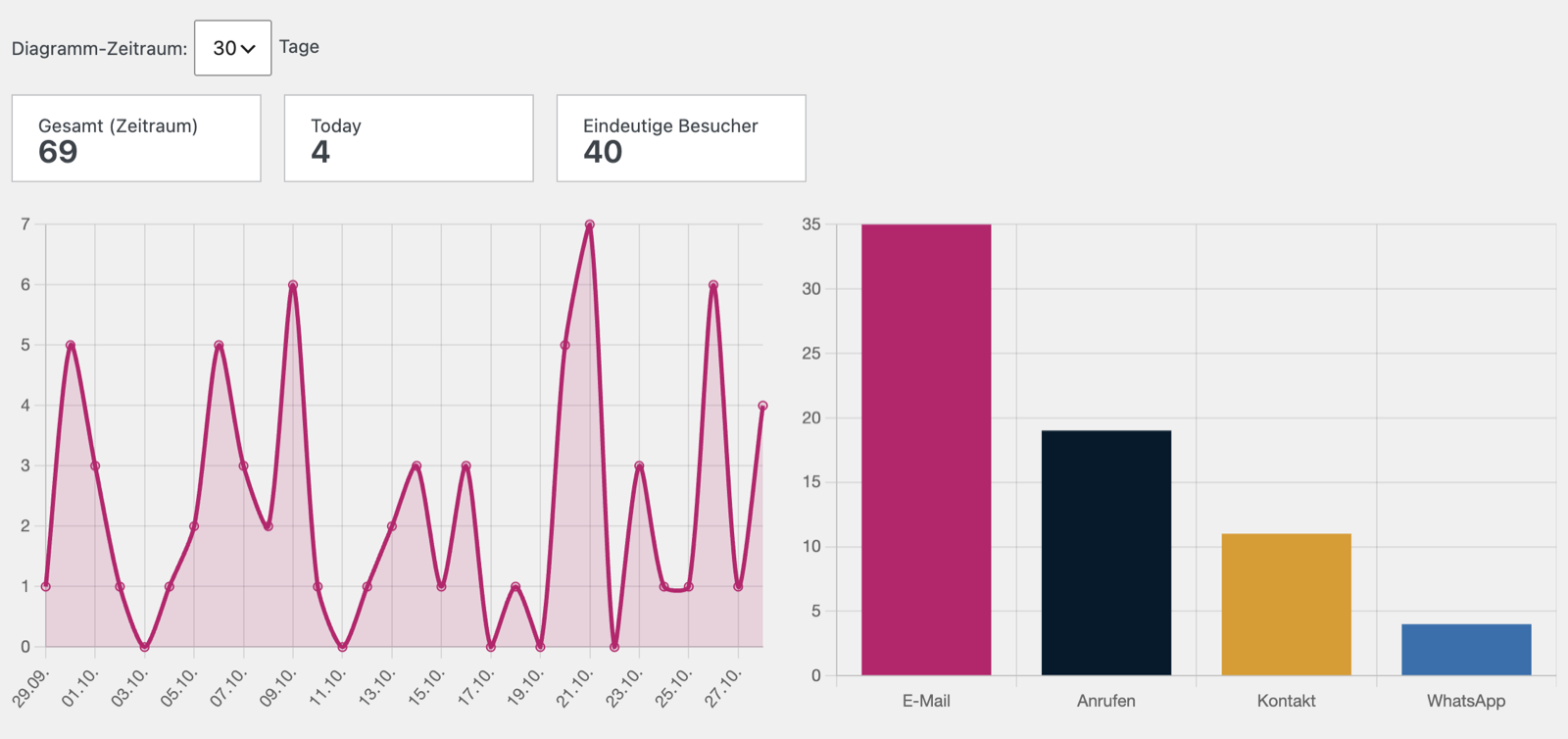
Example view of a 30-day period: 69 click intents from 40 unique anonymous visitors. The values show triggered FAB actions, not confirmed phone calls, delivered emails, or completed orders.
More Context for Marketing and Sales
Each click is understood in the context of the page, action, and responsible area.
Every logged click can contain the page path, contact type, the appropriate mapping label, the time, and a shortened anonymous visitor ID. This reveals which content immediately preceded a contact intent.
Page Context
Identify whether the click was triggered, for example, on a service, reference, product page, or campaign.
Contact Preference
Understand whether your target audience prefers email, phone, WhatsApp, contact forms, or appointment booking.
Activity Timeline
Charts for 7, 30, or 90 days show activity peaks and changes after campaigns or content updates.
Area Mapping
Mapping labels assign clicks to the relevant business department or contact person.
Optional Matomo Integration
From Contact Click to Visitor History – Without Matomo API.
If Matomo is active on the website and a visitor ID is present in the _pk_id.* cookie, the log can display a deep link „Open in Matomo“. Authorized employees can then access the corresponding visitor profile and view – depending on the Matomo configuration – previous page views, origin, and device.
The plugin does not import Matomo reports and does not require an API token. Matomo data is not copied into the Contact-FABs log. URL and Site ID can be entered manually; if Connect Matomo is installed, suitable values can be suggested.
Data protection remains configuration-dependent: Logging, retention, Matomo cookies, consent logic, and privacy policy must align with the specific use case and legal requirements of the website.
1. Interest
A visitor reads a service, reference, or FAQ page.
2. Contact Intent
A FAB click shows the desired contact method and the current page context.
3. Understanding the Click
The log and optional Matomo help to trace the path leading up to the click.
4. Conversation
Only the actual message or phone call turns the intent into a qualified contact.
A Plugin for Multiple Business Departments
Path Mappings Lead Visitors Directly to the Right Contact Point.
Global default targets apply across the entire website. For individual URL areas, phone, email, WhatsApp, contact page, and appointment link can be overridden. The longest matching path prefix wins.
- /marketing/ can lead to marketing consulting.
- /foto/ can use the photography contact persons.
- /wordpress/ can offer support or plugin development.
Show Simplified Mapping Example
[
  {
    "path_prefix": "/marketing/",
    "label": "Marketing",
    "phone": "tel:+491701234567",
    "email": "mailto:beratung@example.com",
    "wa": "",
    "contact_url": "/kontakt/",
    "termine_url": "https://example.com/termin"
  }
]
Appearance & Visibility
- bottom right or left
- with text or icons only
- custom colors and hub tokens
- hideable by content type or path
- optional scroll-to-top button
Routing & Context
- five contact types
- global default targets
- JSON path mappings
- longest prefix wins
- page referer for contact pages
Analytics & Operations
- optional click log
- KPIs and charts
- configurable retention
- optional Matomo deep link
- automatic plugin updates
Install for Free
Get Direct Contact Options in a Few Steps
Current Version: 2.2.7 · WordPress 5.8+ · PHP 7.4+
1. Install Plugin
In WordPress, go to Plugins → Add New → Upload Plugin, then activate it.
2. Configure Contact Methods
Under Settings → Contact FABs, configure the default targets, appearance, position, and visibility. Existing Direct-Contact-FABs settings will be migrated.
3. Analyze & Improve
Optionally enable logging, data retention, and the Matomo link. After a few weeks, evaluate contact types and page contexts and optimize placement.
Frequently Asked Questions about Contact FABs
Do FABs really make contacting you faster?
They shorten the path to the desired communication channel and keep contact options visible. How quickly your company responds afterward depends on internal processes.
Are FAB clicks already leads?
No. The log records click intentions. A confirmed lead is only generated when a message, call, booking, or qualified inquiry is actually received.
Is Matomo required?
No. The contact buttons and internal click log function without Matomo. The Matomo deep link is an optional addition for more visitor context.
Can different sections have different contacts?
Yes. Path mappings can define specific phone numbers, email addresses, WhatsApp targets, contact pages, and appointment links for URL areas.
Can I hide FABs on specific pages?
Yes. Visibility can be controlled by content type and via a list of excluded paths.
Is the plugin free?
Yes. DIRSCHL Contact FABs can be downloaded and used for free. Individual setup, customization, and marketing consulting can be commissioned separately.
Boost your visibility to customers.
Contact FABs simplifies making contact and shows which communication channels generate interest on which pages. Upon request, we support you with setup, mapping, Matomo integration, and incorporation into your marketing strategy.
Download Contact FABs for free
Additionally: more relevant visitors through AI search, B2B company signals with the Matomo Company Resolver, and all marketing solutions.
Download Plugin for Free
Direct ZIP download without a suite license. Alternatively, the plugin can be installed, activated, and updated in the DIRSCHL Hub.