


FREE · OPEN SOURCE · DIRECTLY IN WORDPRESS
DIRSCHL Media Manager – Efficiently manage image metadata in the WordPress Media Library.
Find missing alt texts, directly edit titles, captions, and descriptions, and carefully clean up filenames – without opening each image individually.
The Media Manager bundles editorial media management into a fast, filterable overview. Everything remains within your WordPress installation: no external API, no account, and no token costs.
Version 1.0.1 · WordPress 5.8+ · PHP 7.4+ · Gutenberg, Divi and Elementor · GPL
Download Plugin for FreeInstall via DIRSCHL HubView Quick Start
Fewer Clicks, Better Data
The WordPress Media Library shows your images – the Media Manager shows where work is needed.
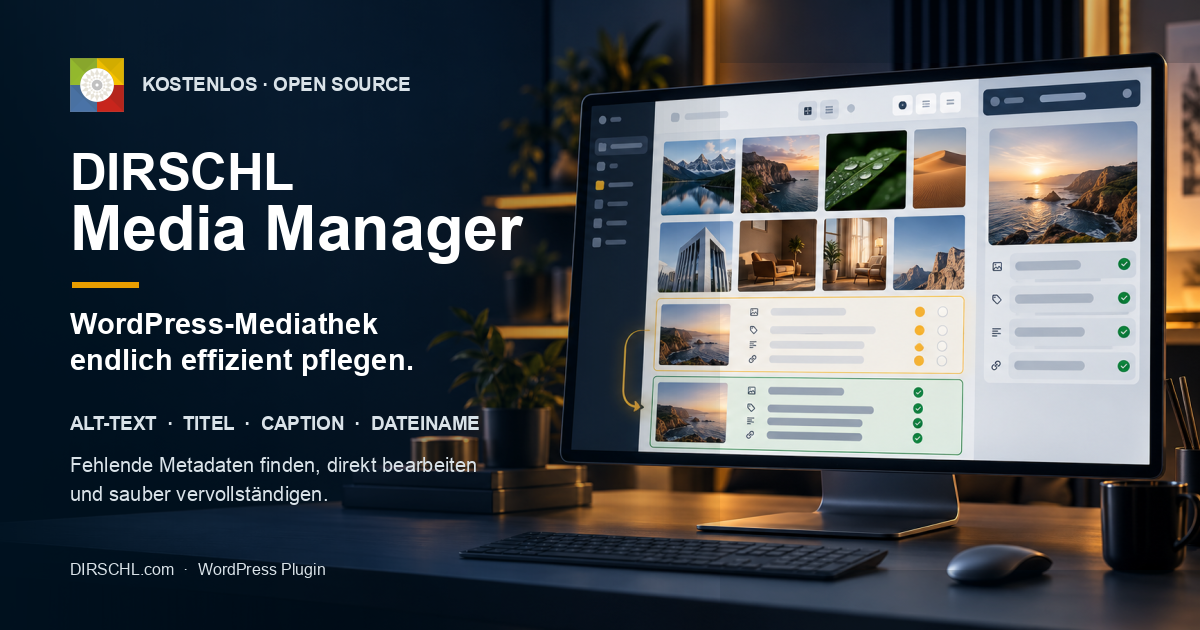
In the standard detail view, each attachment is edited individually. This is manageable for ten images, but for hundreds, it becomes a time sink. DIRSCHL Media Manager displays preview, filename, alt text, title, caption, and description together and saves changes directly to the WordPress attachment.
Thus, the plugin is suitable for image SEO audits, editorial quality assurance, accessibility workflows, relaunches, and ongoing maintenance of large media libraries.
Instantly Identify Completeness
The filters Incomplete, Complete, and All show with counters how many media items need to be reviewed. The overview loads 50 entries per page.
All Important Fields in One View
Alt text, title, caption, description, and filename are edited line by line. A preview and the current status prevent you from losing context while managing.
Local WordPress Workflow
The plugin uses protected internal REST routes, WordPress nonces, and the upload_files capability. It does not automatically transfer Media Library data to external services.
Manage These Five Media Fields Centrally
| Field | What it Represents in WordPress | What the Media Manager Does |
|---|---|---|
| File Name | Physical name of the original file in the upload directory | View, click to create an SEO-friendly slug, and rename in a controlled manner |
| Alt Text | Text alternative for relevant image content | Save directly in the attachment meta field _wp_attachment_image_alt |
| Title | Internal media title and potential output by themes/plugins | Edit WordPress attachment title |
| Caption | Optional visible image caption | Manage attachment caption separately |
| Description | Detailed attachment content | Save formatted content allowed by WordPress |
Important Regarding Alt Text: Not every image requires alt text. Purely decorative images should intentionally retain an empty alt text, depending on their implementation. The filter is a completeness check – not an automatic content evaluation.
When is an image considered "incomplete"?
Version 1.0.1 marks an attachment as incomplete if at least one of the following criteria is met:
| Check | Result |
|---|---|
| Alt text is empty | The entry appears under Incomplete. |
| Title is empty | The entry appears under Incomplete. |
| Caption is empty | The entry appears under Incomplete. |
| Description is empty | The entry appears under Incomplete. |
| Filename contains ä, ö, ü, ß, or uppercase letters in the file stem | The entry appears under Incomplete. |
The filter is intentionally strict. It highlights content that requires editorial review but does not replace expert decisions regarding accessibility, image rights, or keyword usage.
Getting Started
Systematically Clean Up Your Media Library
- Create a Backup: Before renaming physical files, back up your database and uploads.
- Open Media → DIRSCHL Media Manager.
- Start with the Incomplete filter and check the number of open entries.
- Editorially complete the alt text, title, caption, and description. Do not blindly copy the same text into all fields.
- If needed, click on the field label Filename: The plugin generates a lowercase slug, replaces German umlauts, and preserves the file extension.
- Confirm each reviewed row by clicking Save.
- Switch to the Complete filter and randomly check the frontend, lightbox, and downloads.
Renaming Files – With Deliberate Caution
The Media Manager can rename the physical original file in the upload directory and update the corresponding WordPress file path. Existing derived image sizes retain their previous filenames in Version 1.0.1.
The plugin does not search content, CSS files, or third-party tables for hard-coded image URLs. Such direct references may lead to broken links after a rename. Therefore, first create a backup, test critical images individually, and for complex websites, work in a staging environment initially.
If the desired filename already exists or the upload directory is not writable, the plugin will abort the renaming process with an error message.
The Built-in Filename Helper
Clicking the Filename label prepares the current name in the input field:
- Uppercase letters are converted to lowercase.
ä,ö,ü, andßare converted toae,oe,ue, andss.- Spaces and special characters are normalized as hyphens.
- The existing file extension is preserved.
The change is physically executed only when the row is saved.
Exclude Folders from the Main Audit
Technical image assets, archives, or automatically generated media do not always need to appear in the regular audit list. Enter the folder names, separated by commas, in the Media Manager settings.
- Excluded folders disappear from Incomplete, Complete, and All.
- Each excluded folder receives its own filter button with a hit count.
seo-img-linkis excluded by default.- Happy Files and Real Media Library are considered if folder assignments exist.
Clearly Paginated for Large Media Libraries
The admin interface displays 50 filtered media per page and offers previous/next as well as page navigation. Files that no longer exist are skipped from the worklist.
Data is loaded and saved via an internal REST interface. The plugin's JavaScript and CSS are exclusively integrated on the Media Manager admin page – not in the public frontend.
More than Metadata Management
Prepare SEO HTML Prompts from Page and Image Context.
The integrated SEO HTML text generator groups media along with page context and creates a detailed, copy-ready prompt from it. You can group by combined folder/page structure, Happy Files or Real Media Library, parent post, or file path.
If Rank Math is active, the export includes the existing SEO title, description, and focus keywords of the assigned page as context. The generated prompt is displayed in a preview window and can be copied to the clipboard.
No Automatic AI Transfer
DIRSCHL Media Manager does not call ChatGPT or any other AI service. It only generates text locally for copying. Only when you manually insert this prompt into an external service do the contained page and media data leave your WordPress installation.
Therefore, review and shorten the prompt before inserting it, if it might contain internal page titles, URLs, image captions, or other non-public information.
Installation via DIRSCHL Hub
- Download DIRSCHL Hub and install it as a WordPress plugin.
- Open DIRSCHL → Hub.
- Under Free Plugins, install and activate DIRSCHL Media Manager.
- Open Media → DIRSCHL Media Manager.
Neither a license key nor a DIRSCHL account is required.
Direct ZIP Installation
- Download current plugin ZIP.
- Open Plugins → Add New → Upload Plugin.
- Select ZIP, install, and activate.
- Open Media → DIRSCHL Media Manager.
Current Version 1.0.1 · WordPress 5.8 or newer · PHP 7.4 or newer.
Data Privacy and Permissions
- No external API for metadata management or completeness checks.
- REST access requires a valid WordPress nonce.
- Access only for logged-in users with
upload_filespermission. - No frontend scripts and no impact on theme layout.
- No automatic alt-text generation and no hidden token costs.
Gutenberg, Divi, and Elementor
The plugin processes the central WordPress attachment fields. Gutenberg, Divi, Elementor, and other themes or plugins can benefit from this, provided they use these fields for output. The Media Manager does not alter existing page modules and does not enforce any frontend output.
There is no shortcode: DIRSCHL Media Manager is purely an administration tool within the WordPress backend.
Frequently Asked Questions
Does the plugin automatically generate alt text?
No. DIRSCHL Media Manager accelerates manual, editorially controlled maintenance and highlights missing fields. It does not automatically connect to an AI API.
Can the plugin rename physical image files?
Yes. It renames the original file and updates the WordPress file path. A backup is required beforehand because hard-coded URLs in content or third-party systems are not automatically replaced.
What does the "Incomplete" filter mean?
At least one of the fields (Alt Text, Title, Caption, or Description) is empty, or the filename contains German umlauts or uppercase letters in the file stem.
Can I exclude technical media folders?
Yes. Custom folders can be excluded, separated by commas, and then controlled via separate filter buttons. seo-img-link is excluded by default.
Does the plugin support Happy Files and Real Media Library?
Existing folder assignments from both systems are considered for filters and SEO prompt export. The Media Manager does not replace these folder plugins.
Who can use the Media Manager?
Logged-in WordPress users with the `upload_files` capability. Internal REST requests are additionally protected by WordPress nonces.
Are data transferred to external services?
No. Media management and prompt creation run locally within WordPress. Only if you manually copy a generated prompt to an external service will its content be transferred there.
Is DIRSCHL Media Manager free and open source?
Yes. The plugin does not require a DIRSCHL license and can be used, reviewed, and adapted under GPL-2.0-or-later.
Transform your cluttered media library into a clear workflow.
Review and Accurately Complete Image Metadata.
DIRSCHL Media Manager is free, local, and designed for daily editorial work. Install it, open the 'Incomplete' filter, and systematically improve images one by one.
Download DIRSCHL Media ManagerInstall via DIRSCHL HubRead Instructions
100% Free & Open Source
DIRSCHL Media Manager can be used, reviewed, adapted, and further developed for your projects under the terms of the GPL-2.0-or-later without a DIRSCHL license. No paid feature locks, and no DIRSCHL account is required.
Developed by Johann Dirschl. Would you like to develop your own WordPress plugins with Cursor AI or Codex, or automate workflows? The DIRSCHL Academy offers B2B training for AI-assisted Development and WordPress Automation.