


FREE · OPEN SOURCE
DIRSCHL Music – Publish, experience, and discover music.
Our goal: the best WordPress music plugin for independent musicians, labels, creatives, and large music catalogs.
More than just an MP3 player: DIRSCHL Music combines albums, tracks, playlists, synchronized lyrics, downloads, embeds, analytics, virtual music pages, structured SEO, and mobile playback into a complete publishing system on your own domain.
Version 3.0.30 · MP3 & WAV · responsive · Divi & Gutenberg · no DIRSCHL license required
Download Plugin for FreeLive Demo with Real MusicView Shortcode Demos

Why DIRSCHL Music Stands Out
A music plugin that covers the entire journey from upload to listener.
Many WordPress audio plugins simply play a file. DIRSCHL Music, however, organizes a growing music catalog: with dedicated album and track URLs, a clean metadata model, search engine signals, download formats, embeds, and operation that works on desktop, smartphone, lock screen, and supported CarPlay systems.
Album Library Instead of Page Clutter
- Centrally manage albums, groups, and track orders
- Upload MP3 and WAV or scan existing album folders
- Import ID3/getID3 metadata, runtime, and embedded covers
- Generate cover variants, playlist JSON, and optional ZIP packages
- Drag & drop tracks between albums
- No manually maintained WordPress page required per song
A Player That Feels Like a Music Product
- Responsive player and playlist view
- Cover art, progress, volume, search, and shuffle
- MP3 and WAV downloads per track
- Complete album ZIPs for MP3 and WAV
- Light/Dark design via DIRSCHL Hub CSS variables
- Media Session API for lock screen, headsets, and supported CarPlay control
Track-level Music SEO
- virtual URLs for every album and track
- MusicAlbum and MusicRecording JSON-LD
- Open Graph and Twitter Cards with individual track cover
- Canonicals and complete ImageObject data
- dedicated music sitemap and Rank Math integration
- meaningful content for Google, image search, and AI search systems
Publish, share, and analyze
- Album, library, gallery, playlist, or single track via shortcode
- iframe-compatible embeds for external websites and press kits
- Share dialogs for album and track URLs
- synchronized lyrics from LRC, SRT, or WebVTT
- local play analytics without external tracking requirements
- optional WAV→MP3 conversion with ffmpeg
Practicality, not a configuration marathon
From an empty WordPress to a published album.
The backend workflow is designed for real music production: create albums, manage files, control metadata, choose display options, and publish. A complementary upload app is in preparation and will support this process directly from the production computer in the future.
Seven-step Quickstart
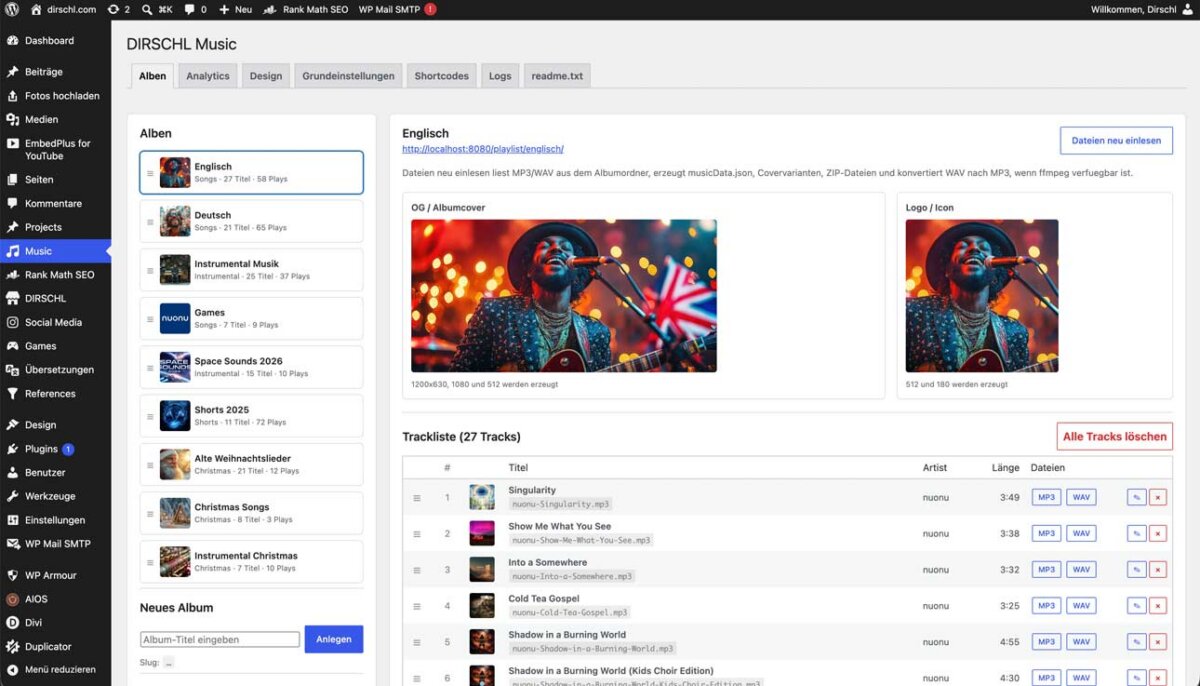
- Download plugin ZIP and activate it under Plugins → Add New → Upload Plugin.
- In the WordPress backend, open DIRSCHL Music → Albums.
- Create album title and slug; add cover, description, artist, and group.
- Upload MP3/WAV or copy files to the album folder.
- Start Rescan Files: metadata, cover, tracklist, and downloads will be generated.
- Check track order, lyrics, descriptions, and download permissions.
- Insert
[dm_album slug="mein-album"]or share the virtual album URL.
Easy to integrate, flexible to combine
The most important shortcodes – clearly explained and free of legacy code.
All examples work in the Gutenberg Shortcode block, Divi text or code modules, Elementor, and classic WordPress templates.
| Shortcode | Usage |
|---|---|
[dm_album slug="mein-album"] |
Complete album with player and tracklist – the best way to get started. |
[dm_album slug="mein-album" view="list"] |
Compact tracklist without a large player. |
[dm_playlist slug="mein-album"] |
Player and playlist for an album slug. |
[dm_playlist slug="mein-album" show="details,summary"] |
Player with lyrics/details column and album summary. |
[dm_album_list] |
Library as a clear list; optionally filterable by group. |
[dm_album_gallery columns="3"] |
Visual album gallery with a customizable number of columns. |
[dm_album_summary] |
Compact album card with a suitable 1200×630 image. |
[dm_track] |
Single track for landing pages, press areas, and embeds. |
[dm_track_details] |
Display track details and synchronized lyrics separately. |
Publish Album
[dm_album slug="international"]
Generates a complete album view. The slug corresponds to the album in the backend.
Library by Group
[dm_album_list group="instrumental"]
Ideal for genres, labels, artists, or thematic collections.
Player with Details
[dm_playlist slug="international" show="details,summary"]
Combines playback, playlist, lyrics, and album information in a powerful presentation.
Responsive Gallery
[dm_album_gallery columns="4" top="20"]
Four columns on desktop; the plugin adjusts the display for smaller devices.
DIRSCHL MUSIC · LIVE DOCUMENTATION
Shortcode Demos: Player, Albums, Gallery, and Single Tracks Live.
The following examples demonstrate the canonical shortcodes of the current plugin version with real data. Below each copyable code, you will see the rendered result directly.
All examples work in Gutenberg, Divi, Elementor, and classic WordPress templates.
How to Use the Examples
- Install DIRSCHL Music and create at least one album in the backend.
- Replace the example slug
englischwith your album's slug. - Copy the shortcode into a Gutenberg shortcode block or a Divi code/text module.
- For lists and galleries, optionally add
count,group,order,columns, andtop.
The demos intentionally use only the current dm_* syntax. Old aliases remain compatible for existing installations but are not necessary for new projects.
1. Album List
The list view is suitable for discographies and archives. count limits the output; order accepts manual, title, or updated.
[dm_album_list count="3" order="manual"]


2. Responsive Album Gallery
The gallery combines covers, titles, and track previews. columns controls the desktop grid, top the number of track previews per album.
[dm_album_gallery columns="3" count="3" top="6"]Englisch
 28


Deutsch
 24


Instrumental Musik
 25


3. Player with Playlist, Details, and Album Summary
The most comprehensive player demo: playback, playlist, and the sidebar for track details, lyrics, and album information. The first track is pre-selected upon loading.
[dm_playlist slug="englisch" show="details,summary"]
-
3:49
-
3:25
-
3:32
-
4:55
-

Shadow in a Burning World (Kids Choir Edition)
4:30 -
 2:36
-
 2:21
-
 3:27
-
 3:29
-
 2:29
-
 2:47
-
 3:08
-
 3:02
-
 3:30
-
 3:33
-
 3:09
-
 3:07
-
3:38
-
 2:56
-
 2:18
-
 3:01
-
 2:51
-
 2:35
-
 3:19
-
 2:59
-
 3:19
-
 2:50
-
 2:37
nuonu
nuonu – Singularity
©2026 Johann Dirschl, nuonu

Englisch
4. Compact Tracklist Without a Large Player
For overview pages, press kits, or narrow content sections, an album can be displayed as a pure tracklist.
[dm_album slug="englisch" view="list"]Englisch
5. Single Track Card
dm_track displays a single song as a compact, shareable player card. Without a track attribute, the plugin uses the first track of the album. Optionally, you can specify a specific track slug.
[dm_track slug="englisch"]6. Track Details and Lyrics Separately
The detail panel can be displayed independently of the player. It adopts existing metadata, description, and synchronized lyrics of the selected track.
[dm_track_details slug="englisch"]nuonu
nuonu – Singularity
©2026 Johann Dirschl, nuonu
Pop · Album: International
[Verse 1] We lived on ghosts and hollow claims, Of paper crowns and stagnant games. They talked in circles, choked the light, While progress gathered speed by night. Then silicon broke the velvet chairs, And cut the knots of old affairs. No "someday" left, no "please, just wait" - The future shipped. We seized our fate. [Pre-Chorus] The speeches fade, the gears ignite, The builder steps into the light. No …
7. Compact Album Summary
The summary card displays the cover, album title, slug, number of tracks, and total playtime. It's ideal for editorial articles, landing pages, and cross-references to an album.
[dm_album_summary slug="englisch"]Englisch
Key Parameters at a Glance
| Parameter | Applies to | Effect |
|---|---|---|
slug |
Album, Playlist, Track, Details, Summary | Selects the album by its backend slug. |
track |
Playlist, Track, Details | Optionally selects a specific track slug. |
view="list" |
Album, Playlist | Outputs the compact track list instead of the large player. |
show="details,summary" |
Album, Playlist | Adds track details/lyrics and the album summary. |
group |
Albumliste, Galerie | Filters exactly by an album group assigned in the backend. |
count |
Albumliste, Galerie | Limits the number of albums displayed; 0 shows all. |
order |
Albumliste, Galerie | Sorts by manual order, title, or update date. |
columns |
Galerie | Sets 1 to 8 desktop columns; on mobile, it wraps responsively. |
top |
Galerie | Limits the number of visible track previews per album. |
Your own website becomes a music platform.
Streaming services remain important reach channels. But only on your own domain do you control design, URLs, metadata, downloads, embeds, and direct contact with your audience. DIRSCHL Music therefore doesn't make WordPress a replacement for Spotify or Apple Music, but rather the stable hub for your releases.
- no need to manually build a page per track
- no external player platform required
- no DIRSCHL license or feature lock
- audio and metadata remain on your own hosting
- open GPL-2.0-or-later source code for your own customizations
Next up: direct upload from the Music app.
The planned DIRSCHL Music App will transfer finished songs, WAV/MP3, covers, lyrics, and metadata to WordPress as an organized release package. The free WordPress plugin remains the public publishing and player layer; the app complements the production workflow.
Frequently Asked Questions
Is DIRSCHL Music really free?
Yes. The WordPress plugin can be installed, used, and customized under GPL-2.0-or-later without a DIRSCHL license.
Where can I test the plugin live?
At dirschl.com/musik, the live demo showcases real albums, tracks, players, downloads, and virtual music pages.
Do I need a WordPress page for every song?
No. DIRSCHL Music generates virtual album and track URLs from your maintained music catalog.
Does the plugin support MP3 and WAV?
Yes. It manages MP3 and WAV, can offer both formats for download, and optionally generate MP3 files from WAV using ffmpeg.
Does the player work with Divi and Gutenberg?
Yes. The canonical shortcodes work in all WordPress areas and page builders that execute shortcodes.
What does CarPlay support mean?
The web player uses the Media Session API for metadata and media commands. Availability and behavior depend on iOS, Safari, and the respective vehicle.
Are plays tracked externally?
The integrated music analytics work locally in WordPress. External tracking services are not required for core operation.
Is an upload app coming?
Yes. A supplementary app for structured upload of audio, covers, lyrics, and metadata is planned.
Music. Beautifully presented. Everywhere.
Make your WordPress website the strongest home for your music.
DIRSCHL Music is free, openly customizable, and built for real catalogs. Install the plugin, experience the demo, and publish your first album on your own domain.
100% Free & Open Source
DIRSCHL Music can be used, tested, customized, and further developed for your own projects under the terms of the GPL-2.0-or-later without a DIRSCHL license. There are no paid feature locks and no required DIRSCHL account.
Developed by Johann Dirschl. Do you want to develop your own WordPress plugins with Cursor AI or Codex or automate workflows? The DIRSCHL Academy offers B2B training for AI-assisted Development and WordPress Automation.
Download Plugin for FreeInstall in DIRSCHL HubDIRSCHL Academy
Pop · Album: International
[Verse 1] We lived on ghosts and hollow claims, Of paper crowns and stagnant games. They talked in circles, choked the light, While progress gathered speed by night. Then silicon broke the velvet chairs, And cut the knots of old affairs. No "someday" left, no "please, just wait" - The future shipped. We seized our fate. [Pre-Chorus] The speeches fade, the gears ignite, The builder steps into the light. No …