


Free WordPress Plugin
DIRSCHL Hub
The DIRSCHL Hub is the central management interface for DIRSCHL plugins in WordPress. It displays free and licensed products, installs and activates available plugins, manages your license, and delivers new versions via the WordPress update manager.
Additionally, you control shared CSS variables as well as the Light, Dark, or Auto mode for compatible plugins and your website from one central location.
Current version 0.5.41 · permanently free.
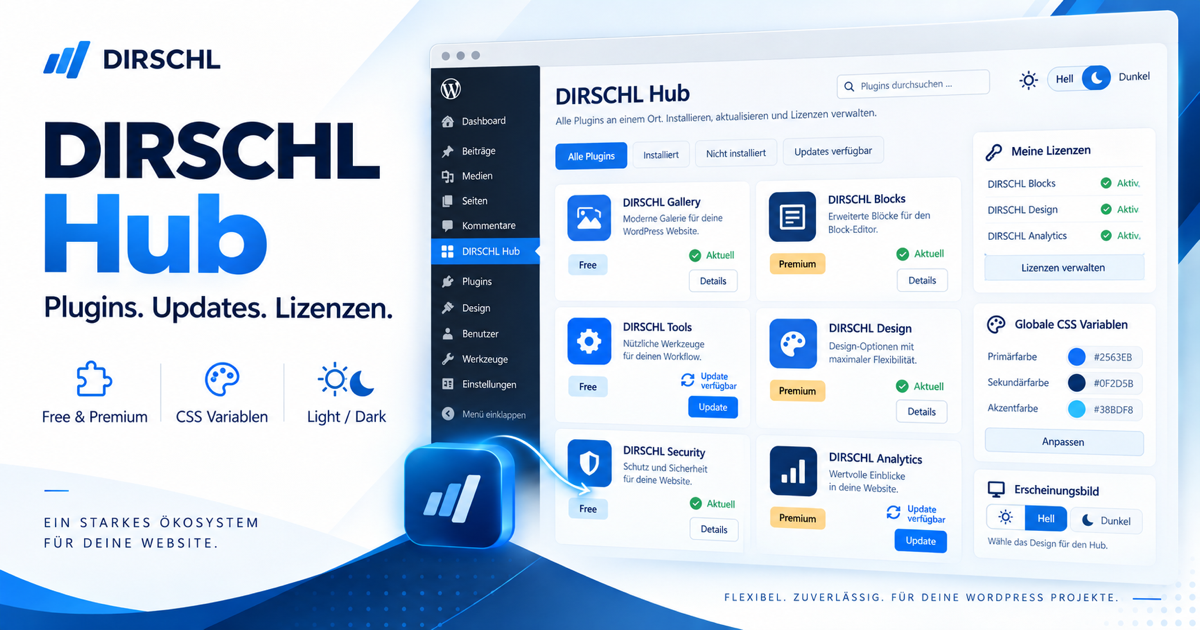
A Catalog for Free and Premium Plugins
In the WordPress backend, the Hub bundles all available DIRSCHL products. On each product card, you will see the description, version status, and installation status. From there, you can install a free plugin, activate an existing plugin, or open the corresponding product page with instructions.
- Free Plugins: Install and update from the Hub without a license.
- Premium Plugins: Download, activate, and keep up-to-date after license verification.
- Product Pages: Directly access features, configuration, examples, and notes.
- Targeted Selection: You only install the plugins you truly need.
You can find the complete catalog and current pricing on the Plugin Overview.
Installation and First Steps
- Download DIRSCHL Hub as ZIP.
- In WordPress, open Plugins → Add New → Upload Plugin, select the ZIP file, and activate the plugin.
- Open DIRSCHL → Hub. Free plugins can be installed immediately.
- For premium products, enter the license key in the Hub and have it verified.
- Install or activate the desired plugin; subsequent releases will appear as WordPress updates.
Important: DIRSCHL plugins can generally also be used without the Hub. However, the Hub is recommended for central deployment, license verification, and a convenient update channel.
Central CSS Variables and Appearance
Under DIRSCHL → CSS & Theme, you manage a shared color palette for compatible DIRSCHL plugins. Separate values are available for light and dark displays. A live preview shows changes before saving.
The active variables are --dh-text, --dh-background, --dh-surface, --dh-border, --dh-accent, --dh-accent2, --dh-header, --dh-footer, --dh-control, and --dh-input. This allows for consistent design of surfaces, texts, borders, accent colors, headers, footers, and forms.
Light, Dark, or Automatic
You can choose a fixed Light or Dark mode, or let the visitor's system setting decide. The shortcode inserts a toggle switch if desired. The visitor's selection is retained in the browser and adopted by supported plugins.
Licenses, Activation, and Updates
After purchase, you enter the license key once in the Hub. The Hub verifies authorization for the included products and makes the corresponding downloads and updates available. The key does not need to be re-entered in each individual plugin.
- Centrally store and validate license status
- Install or activate authorized premium plugins
- Receive updates via the familiar WordPress interface
- Open product pages and instructions directly from the catalog
For updates, the DIRSCHL Hub should remain installed and active on your website.
Frequently Asked Questions
Does the DIRSCHL Hub cost anything?
No. The Hub itself and plugins marked as Free can be used without a Suite license. Only premium products require a suitable license.
Do I have to install all plugins?
No. The Hub displays the catalog; you select each product individually.
Does Dark Mode overwrite my entire theme?
The Hub provides common variables and optional theme rules. Their impact depends on the chosen configuration and the support from your theme and plugins.
Where can I find prices and included products?
The current overview is available on DIRSCHL Plugins & Prices.
Manage DIRSCHL Plugins Centrally
Install the free Hub, select the plugins you need, and keep track of licenses, updates, and the unified appearance all in one place.
100% Free & Open Source
DIRSCHL Hub can be used, reviewed, adapted, and further developed for your own projects under the terms of the GPL-2.0-or-later without a DIRSCHL license. There are no paid feature locks and no required DIRSCHL account.
Developed by Johann Dirschl. Do you want to develop your own WordPress plugins with Cursor AI or Codex, or automate workflows? The DIRSCHL Academy offers B2B training for AI-assisted Development and WordPress Automation.