


Free WordPress Plugin
Display YouTube Playlists as a Flexible Video Gallery in WordPress.
DIRSCHL YouTube Playlist combines a large player with a clickable grid or list view.
Showcase music, courses, testimonials, series, and social videos directly on your website. Multiple playlists, freely selectable aspect ratios, and an optional subscribe button can be configured without programming.
Version 1.1.5 · WordPress 5.8+ · PHP 7.4+ · no license required
Download Version 1.1.5 for free
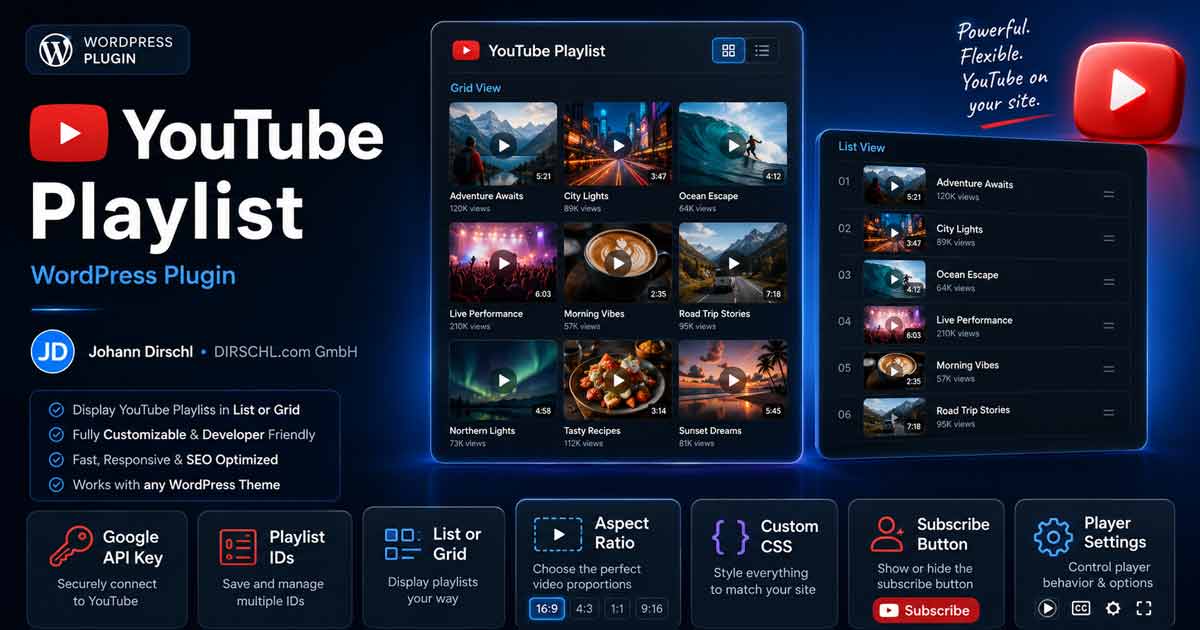
One Player, Multiple Views: Grid, List, Square, Classic, or Vertical.
Show Videos Where Customers Learn About Your Services
Your YouTube Content Remains Visible and Usable on Your Own Website.
YouTube is excellent for video distribution. However, your website remains the central hub for services, products, courses, and inquiries. The plugin connects both: visitors discover a complete playlist on your site and switch videos without having to search on YouTube first.
Large Player with Previews
Clicking a thumbnail changes the video in the main player. Alternatively, the player can be hidden, and only the gallery used.
Grid or List
Use a compact tile view or a list with video titles – suitable for music, courses, testimonials, and editorial series.
Any Aspect Ratio
16/9, 1/1, 9/16, 2/3, or a custom ratio: the player and thumbnails follow the chosen format.
One Playlist, Many Applications
For Recurring Video Formats Instead of Individual Embeds.
Music & Podcasts
Display music videos, sessions, interviews, and episodes as an organized collection directly on artist, album, or topic pages.
Courses & Tutorials
Offer learning videos and step-by-step series in a clear sequence. An additional course system is required for access or progress controls.
Testimonials & Business
Integrate project films, product demonstrations, customer testimonials, and event videos into the relevant service pages.
Social & Portrait Format
Display square and vertical content with the appropriate ratio, without forcing them into a classic 16:9 layout.
Quick Start
From YouTube Playlist to WordPress Gallery in Three Steps.
- Connect YouTube Data API v3: Save API key under Settings → YouTube Playlist → Settings.
- Create Playlist: In the Playlists tab, enter Name, Shortcode ID, YouTube Playlist ID, Layout, and Ratio.
- Insert Shortcode: Use in a Shortcode block, Divi Code module, or suitable content area.
[dirschl_youtube_playlist id="musik"]The id is the self-chosen slug of the saved playlist. The backend displays a copyable shortcode for each created playlist.
1. API Key
In the Google Cloud Console, create a project, activate the YouTube Data API v3, and generate an API key. The key is used server-side in WordPress and should not be included in the shortcode.
2. Playlist ID
The ID is in the YouTube URL after list= and usually starts with PL for standard playlists. Private, deleted, or unavailable videos are not displayed.
3. Cache
Playlist data is cached, which prevents it from consuming API quota with every page view. You can set it from 1 to 24 hours; 3 to 6 hours is suitable for many websites.
Shortcode Examples
Control Layout, Player, and Format for Each Embed.
Saved values can be specifically overridden in the shortcode. This allows the same playlist to appear differently in various locations.
Square Music Gallery
[dirschl_youtube_playlist
 id="musik" layout="grid"
 ratio="1/1" player="1"
 subscribe="1"]
Player, square thumbnails, and subscribe button.
Vertical Video List
[dirschl_youtube_playlist
 id="shorts" layout="list"
 ratio="9/16" player="1"
 subscribe="0"]
Suitable for portrait-oriented videos with titles in list format.
Gallery Only
[dirschl_youtube_playlist
 id="referenzen" layout="grid"
 ratio="16/9" player="0"]
Without an embedded main player; a click opens the video on YouTube.
Live Demo
Experience the "music" playlist in action.
The demo showcases a public music playlist as a square grid with a main player, clickable previews, and a channel subscribe button. This allows you to see how the plugin works on the frontend before installation.
Key Shortcode Parameters.
id and playlist_id
id loads a configuration saved in the backend. playlist_id can directly specify a public YouTube playlist and overrides its saved playlist ID.
layout and ratio
layout="grid" or layout="list". The ratio accepts positive width/height values such as 16/9, 1/1, 9/16, or 5/7.
player and autoplay
player="1" displays the main player. With player="0", only the gallery remains. Autoplay is disabled by default and can be activated with autoplay="1".
subscribe
subscribe="1" adds a subscribe button for the playlist's channel. The display uses the central colors of the DIRSCHL Hub.
Technology, Performance, and Responsibility
Only Load What Each Page Truly Needs.
Conditional Assets
Frontend CSS and JavaScript are only loaded on pages containing the playlist shortcode. Without the shortcode, no additional plugin overhead is created on other pages.
API Data in Cache
WordPress stores playlist and channel information as transients. This reduces external queries and conserves your daily YouTube API quota.
Data Privacy Considerations
When a page with a player is accessed, resources from YouTube or Google are loaded. Please review your privacy policy and consent solution for your specific use case.
Install for Free
Direct Download or Installation via the DIRSCHL Hub.
Current Version: 1.1.5 · WordPress 5.8+ · PHP 7.4+ · GPL-2.0-or-later
1. Download ZIP
The download endpoint automatically provides the current stable ZIP.
2. Activate Plugin
Under Plugins → Add New → Upload Plugin, select the ZIP, install, and then activate it.
3. Set up connection
Under Settings → YouTube Playlist, save the API key and cache duration, then configure at least one playlist.
4. Insert shortcode
Copy the automatically generated shortcode and paste it on the desired page. New versions will subsequently appear as a WordPress update.
Frequently Asked Questions about DIRSCHL YouTube Playlist
Is DIRSCHL YouTube Playlist free?
Yes. The plugin can be downloaded, installed, and updated without a license key. Installation via the DIRSCHL Hub is also free.
Do I need a YouTube API key?
Yes. The plugin reads playlist and channel information via the YouTube Data API v3. The API key is stored in the WordPress settings and used for server-side queries.
Can I manage multiple playlists?
Yes. In the Playlists tab, you can create multiple entries with their own name, slug, playlist ID, layout, ratio, player, and subscription option.
Do square and vertical videos work?
Yes. The aspect ratio is freely selectable. In addition to 16:9, options like 1:1, 9:16, 2:3, or 5:7 are possible.
Can the gallery be used without an embedded player?
Yes. With player="0", only the gallery or list is displayed. A click then leads to the respective video on YouTube.
Are YouTube resources loaded on every page?
No. The plugin's frontend assets are only included if the playlist shortcode is used on the page. However, YouTube or Google resources are loaded on the shortcode page itself.
Install the latest version for free.
Start with a public YouTube playlist, then adapt the grid, list, player, and aspect ratio to your website. We can assist you with custom video sections, course integrations, or white-label solutions.
Download DIRSCHL YouTube Playlist 1.1.5