


FREE · OPEN SOURCE · WORDPRESS
DIRSCHL Reference Hub – Automatically collect and effectively showcase your references.
Local WordPress sites, projects, XML sitemaps, RSS feeds, and selected URLs become a central, searchable reference and project archive.
The plugin extracts the title, description, image, date, and link, normalizes the data as Reference Items, and publishes them as a responsive card or list view with search, group filters, and optional infinite scroll.
Version 0.5.35 · no DIRSCHL license · Gutenberg, Divi, and Elementor · Vanilla JavaScript
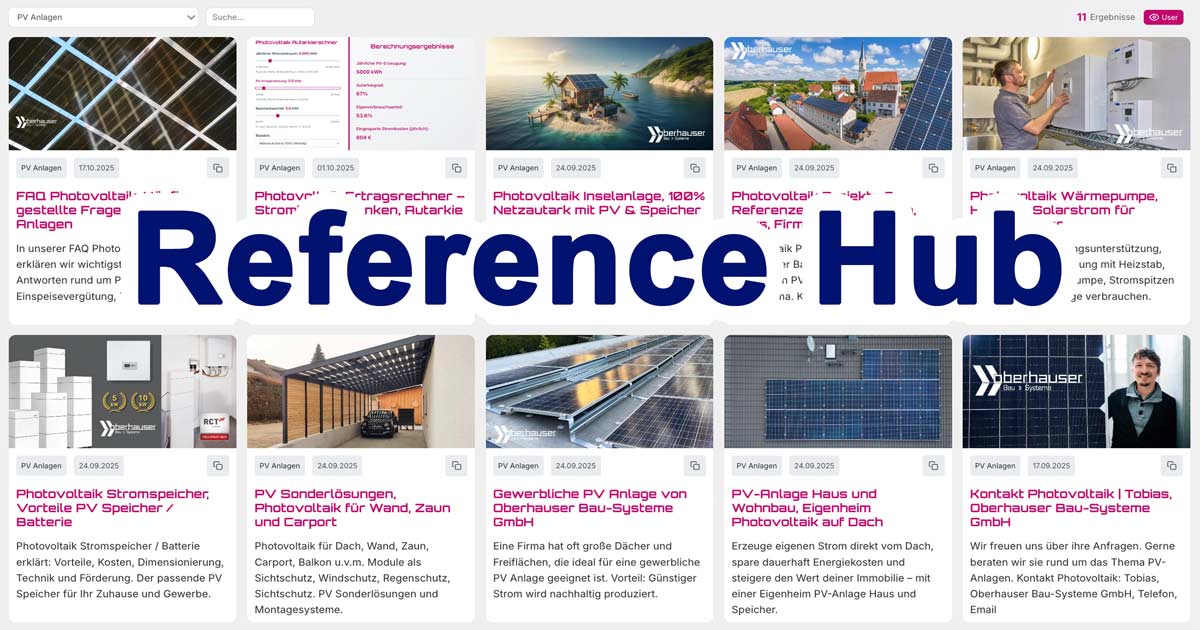
One database instead of many manually maintained galleries
Scattered project pages become a vibrant Reference Hub.
References are often spread across multiple websites, subpages, project post types, and feeds. DIRSCHL Reference Hub brings this content together, eliminating the need to maintain each card twice. The original page remains the link target; WordPress additionally manages a compact Reference Item for search, filters, order, and editorial control.
Content from Multiple Sources
- local WordPress sites and nested pages
- Divi projects and other local post types
- external XML sitemaps and sitemap indexes
- RSS/Atom feeds and manual URL lists
- Include/exclude filters for targeted imports
User-Friendly Frontend
- responsive card or list view
- full-text search and group dropdown
- infinite scroll or controlled 'Load More' button
- automatically handle internal and external link targets
- server-side rendered content for search engines
Synchronize Without Losing Editorial Control
- full sync or resource-efficient batch sync
- optional automatic sync
- import locks for manually optimized fields
- revisions and configuration restoration
- fallback image and custom light/dark adjustments
For Agencies, Businesses, and Content Networks
- agency portfolio and client references
- construction, energy, and real estate projects
- location, brand, or partner networks
- editorial topic and content hubs
- multiple websites in a central reference view
The Process in Practice
Define source, synchronize, review, publish.
- Create groups: e.g., projects, photovoltaics, architecture, or client testimonials.
- Define sources: local WordPress paths or external sitemap, feed, and URL sources.
- Synchronize: the plugin creates or updates normalized Reference Items.
- Curate: Review title, description, image, date, group, and link target; lock important fields.
- Publish: insert gallery shortcode into Gutenberg, Divi, Elementor, or a template.
Easiest Way: Installation via DIRSCHL Hub
- Download DIRSCHL Hub as ZIP.
- In WordPress, open Plugins → Add New → Upload Plugin, select the ZIP, and activate it.
- In the left dashboard menu, open DIRSCHL → Hub.
- In the Free Plugins section, click Install for DIRSCHL Reference Hub and then Activate.
- Afterward, the new main menu References will appear on the left.
Free plugins do not require a license key or a DIRSCHL account. The Hub will also handle available plugin updates later.
Alternatively: Direct ZIP Installation
- Download current Reference Hub ZIP.
- Open Plugins → Add New → Upload Plugin.
- Select the ZIP, click Install Now, and then Activate.
- Open References → Help; you will also find ready-to-copy JSON examples there.
Current Version 0.5.35. The plugin folder is named dirschl-reference-hub; it is operated via the References menu.
The Essential Quick Start
Set up your first local reference gallery in the WordPress dashboard.
For an initial test, you do not need an external sitemap. Create a group and import an existing page section. The following example includes all published subpages under /referenzen/ and assigns them to the projekte group.
- References → Ref Items → Groups: Create Group Projects with the slug
projekte. - Open References → Local and completely replace the existing JSON configuration with the example below.
- Important:
pathis the WordPress page path without the domain and without a leading or trailing slash – not a server or folder path. - Click Format. If the structure remains readable, then Save.
- Open References → Ref Hub and first start the Batch Sync.
- Check the generated entries under References → Ref Items.
- Insert the gallery shortcode on a page.
{
  "parents": [],
  "include_projects": false,
  "local_paths": [
    {
      "path": "referenzen",
      "group": "projekte",
      "include_parent": false,
      "include_children": true,
      "only_direct_children": false,
      "exclude_children": []
    }
  ]
}
The Corresponding Gallery Shortcode
[ref_gallery view="cards" group="projekte" search="1" filters="1"]
Replace referenzen with the actual page path and projekte with the exact group slug of your installation.
Understanding Local JSON Configuration
The local configuration is a JSON object. Commas, double quotes, and true/false must be exact. For new setups, we recommend using local_paths because it clearly defines the group, depth, and exclusions for each area.
| Key | Meaning |
|---|---|
parents |
Short alternative/quick form for parent page slugs. Imports direct children; for precise grouping, it's better to leave this empty and use local_paths. |
include_projects |
true imports published posts of the 'project' post type, such as Divi projects; false excludes them. |
local_paths |
List of specific WordPress page paths with their own group and import rules. |
path |
Permalink path without domain and slashes, e.g., referenzen or unternehmen/projekte. |
group |
Exact slug of a group previously created under Groups. |
include_parent |
For a direct path: include the parent page itself. For nested paths with a slash, the plugin only processes their children. |
include_children |
Include subpages of this area. |
only_direct_children |
true stops after the first level; false recursively imports further subpages. |
exclude_children |
Exclude slugs, paths, wildcards like entwurf-* or regular expressions; descendants of excluded pages are also skipped. |
include_posts |
Optionally import posts/CPTs whose permalink begins with path. |
post_types |
Optional list of post types for include_posts; default is post. |
Practical Example: Nested Pages, Divi Projects, and Posts
This example imports subpages from /leistungen/referenzen/, excludes drafts, includes published Divi projects, and adds posts under the URL prefix /blog/. Create the groups kundenprojekte and fachartikel before syncing.
{
  "parents": [],
  "include_projects": true,
  "local_paths": [
    {
      "path": "leistungen/referenzen",
      "group": "kundenprojekte",
      "include_children": true,
      "only_direct_children": false,
      "exclude_children": ["entwurf-*", "intern"]
    },
    {
      "path": "blog",
      "group": "fachartikel",
      "include_parent": false,
      "include_children": false,
      "include_posts": true,
      "post_types": ["post"]
    }
  ]
}
External Sources: Sitemap, Feed, or Fixed URL List
Under References → Sources, the plugin always expects a JSON array – even if only one source is present. Each source receives a mode, a URL or URL list, and a group slug. respect_canonical ensures that canonical URLs are considered.
XML Sitemap
[
  {
    "name": "Projekt-Sitemap",
    "mode": "sitemap",
    "url": "https://www.example.com/project-sitemap.xml",
    "group": "externe-projekte",
    "respect_canonical": true
  }
]
RSS and Manual URL List
[
  {
    "name": "News-Feed",
    "mode": "rss",
    "url": "https://www.example.com/feed/",
    "group": "news",
    "respect_canonical": true
  },
  {
    "name": "Ausgewählte Referenzen",
    "mode": "list",
    "urls": [
      "https://www.example.com/referenz-a/",
      "https://www.example.com/referenz-b/"
    ],
    "group": "auswahl",
    "respect_canonical": true
  }
]
Avoid Errors
- Create group slugs first, then use them exactly in the JSON.
- An HTML overview page is not an XML sitemap; use the 'list' mode for it.
- For large sitemap indexes, use batch sync first instead of full sync.
- Use include_regex and exclude_regex to include only desired language or content areas.
- Independently check external retrieval rights, data protection, copyright, and update intervals.
The Secure First Sync
- Start Batch Sync: The queue is prepared, and URLs are processed in small batches.
- Check Reference Items: Are the title, description, image, date, URL, and group correct?
- Improve Editorially: Manually correct texts or images as needed.
- Set Import Lock: Protect manually optimized fields from being overwritten later.
- Activate Autosync Only Afterward: Only when the source and rules are working reliably.
Before major changes, you can back up sources and settings under References → Revisions and restore them if needed.
Groups, Order, and Design
- Groups can be shown/hidden in the filter and sorted by drag & drop.
- Reference Items can be editorially grouped and displayed in a custom order.
- The link target can be opened automatically, in the same tab, or in a new tab.
- Under References → Design, you can select Light, Dark, or Custom and define a fallback image.
- The DIRSCHL Hub can provide shared colors and Light/Dark tokens site-wide.
Gallery Shortcodes for Gutenberg, Divi, and Elementor
The standard shortcode provides search, filters, and responsive cards. For large catalogs, per_page="0" starts with 20 entries and loads more via infinite scroll; a positive number instead uses a controlled 'Load More' button.
| Example | Usage |
|---|---|
[ref_gallery view="cards" search="1" filters="1"] |
Complete Hub as cards with search and group filter. |
[ref_gallery view="list" group="projekte"] |
SEO-friendly list of a specific group. |
[ref_gallery per_page="12" sort="number"] |
Twelve entries per step in a custom order. |
[ref_gallery filters="0" sort="abc" target="same"] |
Alphabetical gallery without group filters; links open in the same tab. |
[dirschl_reference_hub_search url="/hub/"] |
Standalone search that redirects to a Hub page. |
Additional Attributes: group, view, search, filters, per_page, target, lang and sort (date, number, abc).
The plugin is live on dirschl.com
Test the Reference Hub with real references.
The preview shows six real Reference Items. The complete demo at /hub/ offers search, group filters, and the entire catalog.
Frequently Asked Questions
Do I need to know how to write JSON?
No. You copy a valid example and only change the path, group, and desired options. The Format button helps to immediately highlight syntax errors.
What is the difference between Sources and Local?
Sources imports external sitemaps, RSS feeds, and URL lists. Local reads published content from the same WordPress installation based on its page paths or post types.
What do I enter for "path"?
The WordPress permalink path without domain and slashes, for example, "references" or "company/projects". It is not a server folder.
Will my original pages be changed?
No. The plugin creates its own reference items for the gallery and links from there to the respective original page.
Does a sync overwrite manual changes?
Source-controlled fields can be updated. For editorially optimized entries or fields, set an import lock and use revisions before major changes.
Does the Hub work with Divi and Gutenberg?
Yes. The output is via shortcode and works in Gutenberg shortcode blocks, Divi code or text modules, Elementor, and classic templates.
Does the plugin require external services?
For local content, no. External sitemap, feed, or URL sources are retrieved server-side from the addresses you configure.
Is DIRSCHL Reference Hub really free?
Yes. The plugin does not require a DIRSCHL license and can be used and adapted under GPL-2.0-or-later.
Your best projects deserve more than a static subpage.
Build a searchable content hub from your references.
Install DIRSCHL Reference Hub for free, start with a local page path, and then expand the catalog with sitemaps, feeds, or additional websites.
Download Reference HubOpen Live DemoInstallation via DIRSCHL Hub
100% Free & Open Source
DIRSCHL Reference Hub can be used, reviewed, customized, and further developed for your own projects under the terms of the GPL-2.0-or-later. There are no paid feature locks, and no DIRSCHL account is required.
Developed by Johann Dirschl. Would you like to develop your own WordPress plugins with Cursor AI or Codex, or automate workflows? The DIRSCHL Academy offers B2B training for AI-assisted Development and WordPress Automation.